Acer Nitro 5 review: Solid budget gaming performance
Expert’s Rating
Pros
- Strong CPU/GPU pairing for the price
- Roomy 1TB SSD with room to add second drive
- Decent battery life
- Quiet operation
Cons
- Plastic chassis is bulky and hefty
- Dim display
- So-so keyboard and tiny touchpad
- Terrible webcam
Our Verdict
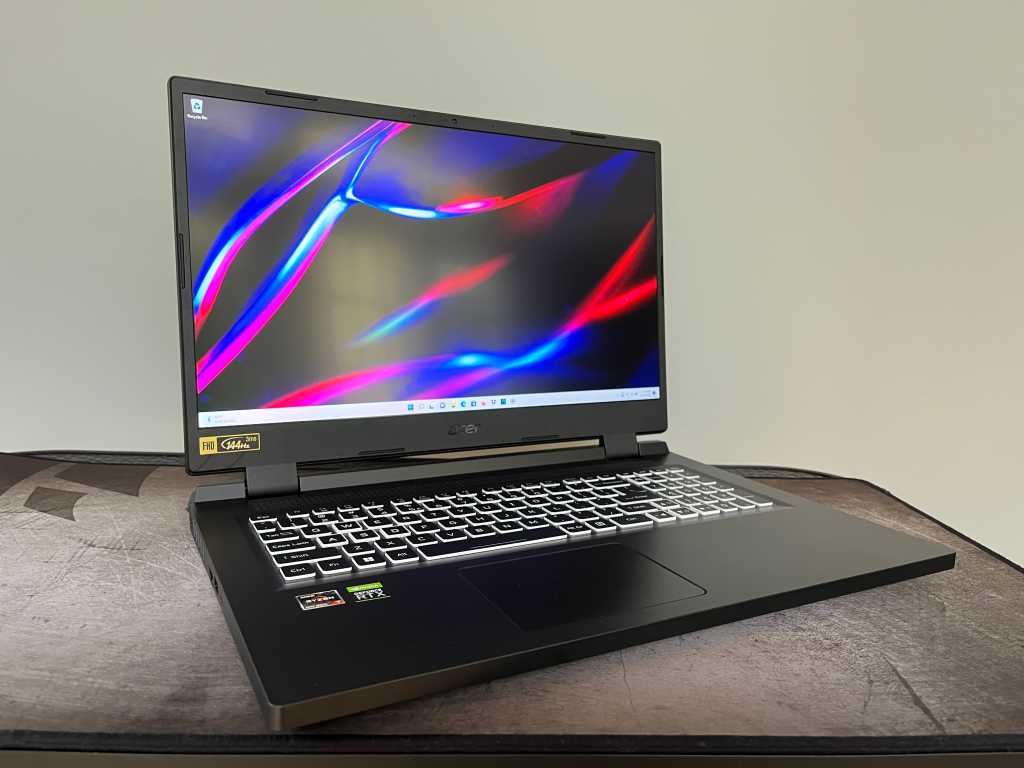
The 17.3-inch Acer Nitro 5 provides ample performance and screen real estate for the money if you are willing to make do with a clunky, plastic chassis.
Price When Reviewed
$1,199.99
Best Prices Today: Acer Nitro 5 AN517
If you have shopped for a budget gaming laptop, then you are likely familiar with Acer’s Nitro 5. Most Nitro 5 units are based on a 15.6-inch display, but this Nitro 5 AN5174-2 model bumps out the screen to an expansive 17.3 inches. It will come as no surprise when I tell you that this larger version is heftier and bulkier than the already hefty and bulky 15-inch size. And while the panel may be larger, it certainly isn’t any brighter than the dim display we’ve experienced on the smaller model.
If getting the most bang for your 3D-pixel-pushing buck, however, is more important than obtaining a sleek design with a bright display, this Nitro 5 AN512 unit delivers competitive performance for a great price. For a reasonable $1,199.99, our test system services up an octa-core Ryzen 7 CPU from AMD’s latest 6000 series and a midrange GeForce RTX 3060 GPU. This combination teams up to produce framerates usually found on costlier systems.
Acer Nitro 5 specifications and features
Our test model (AN517-42-R85S) is based on the AMD Ryzen 7 6800H CPU and GeForce RTX 3060 graphics. It’s on sale at MicroCenter for $1,199.99, which is $330 less than its regular price of $1,529.99. Here’s the longer spec list:
- CPU: Octa-core AMD Ryzen 7 6800H
- Memory: 16GB
- Graphics: Nvidia GeForce RTX 3060
- Storage: 1TB PCIe NVMe M.2 SSD
- Display: 17.3-inch, 1920×1080, 144Hz IPS LCD
- Webcam: 720p
- Connectivity: 1 x USB 3.2 Gen 2 Type-C, 2 x USB 3.2 Gen 2 Type-A, 1 x USB 3.2 Gen 1 Type-A, HDMI 2.1, ethernet, combo audio jack.
- Networking: Wi-Fi 6E, Bluetooth 5.2
- Biometrics: None
- Battery capacity: 96 Watt-hours
- Dimensions: 15.77 x 11.59 x 1.1 inches
- Measured weight: 6.6 pounds (laptop), 1.67 pounds (AC adapter)
- Price: $1,199.99
Acer sells a number of 17.3-inch Nitro 5 AN517-42 models with the Ryzen 7 6800H CPU that range in price from $1,319.99 to $2,199.99. All are based on the Ryzen 6800H CPU and graphics options range from the RTX 3050 Ti to the RTX 3070. Two resolutions are offered for the 17.3-inch display, either 1920×1080 or 2560×1440.
Big and bulky, but quiet
The Nitro 5 AN517 is a big honkin’ laptop. It’s nearly 16 inches wide, more than 11 inches deep, over an inch thick and tips the scales at 6.75 pounds. And its huge, 280-watt power brick adds another 1.67 pounds to the total carrying weight. This is not a laptop for daily or even frequent travel.
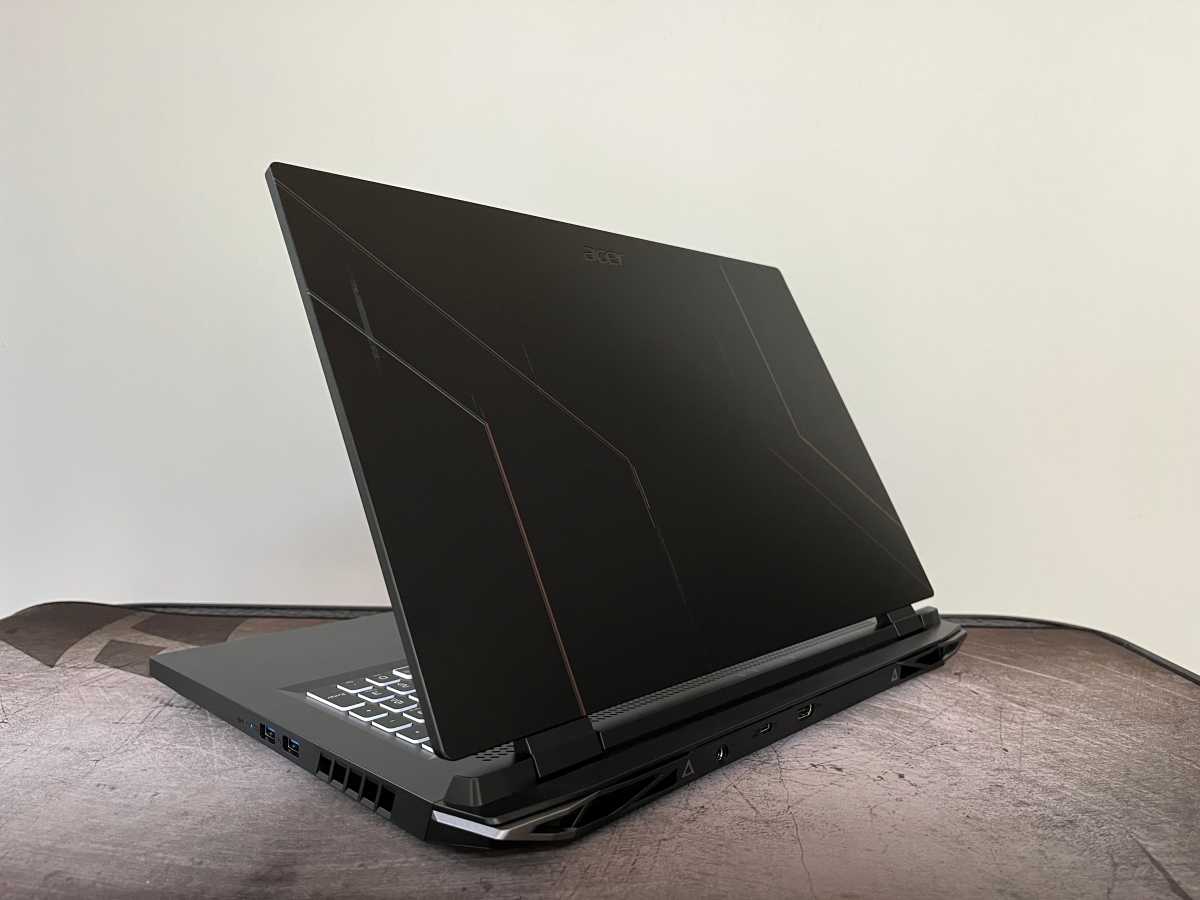
The extra-large Nitro 5 follows the same script as the more common 15-inch models. Black molded plastic rules the day. In addition to the usual red accents that the Nitro 5 has been rocking for some time now, this model has some faint blue accents on the lid along with the subtle red accents. Open the laptop up and it’s an all-matte-black affair: black-matte display bezels, black-matte keyboard deck, and matte-black keys. Breaking up the monochrome matte-black look are the sides of the keys, which are white. That lends a bit of a contrast and visual interest to the overall look of the laptop.
IDG / Matthew Elliott
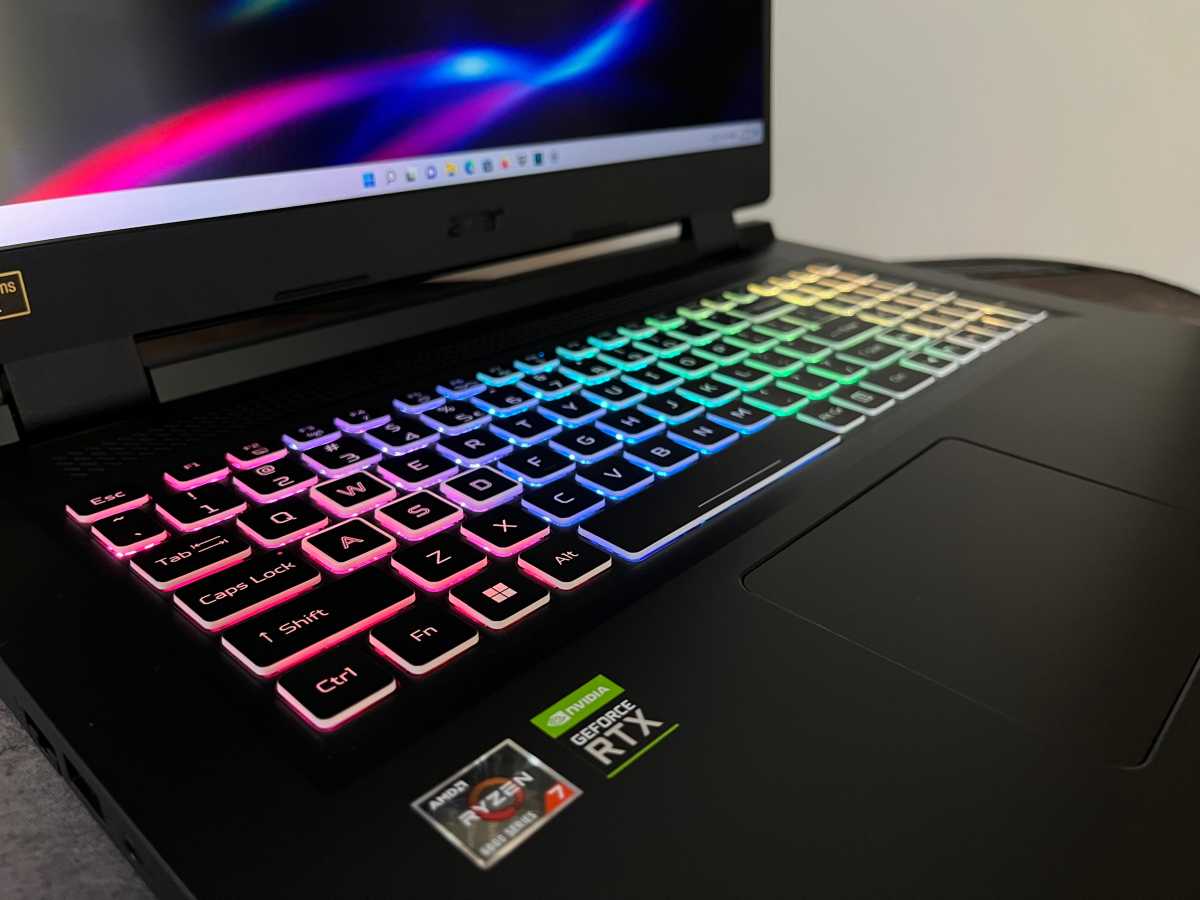
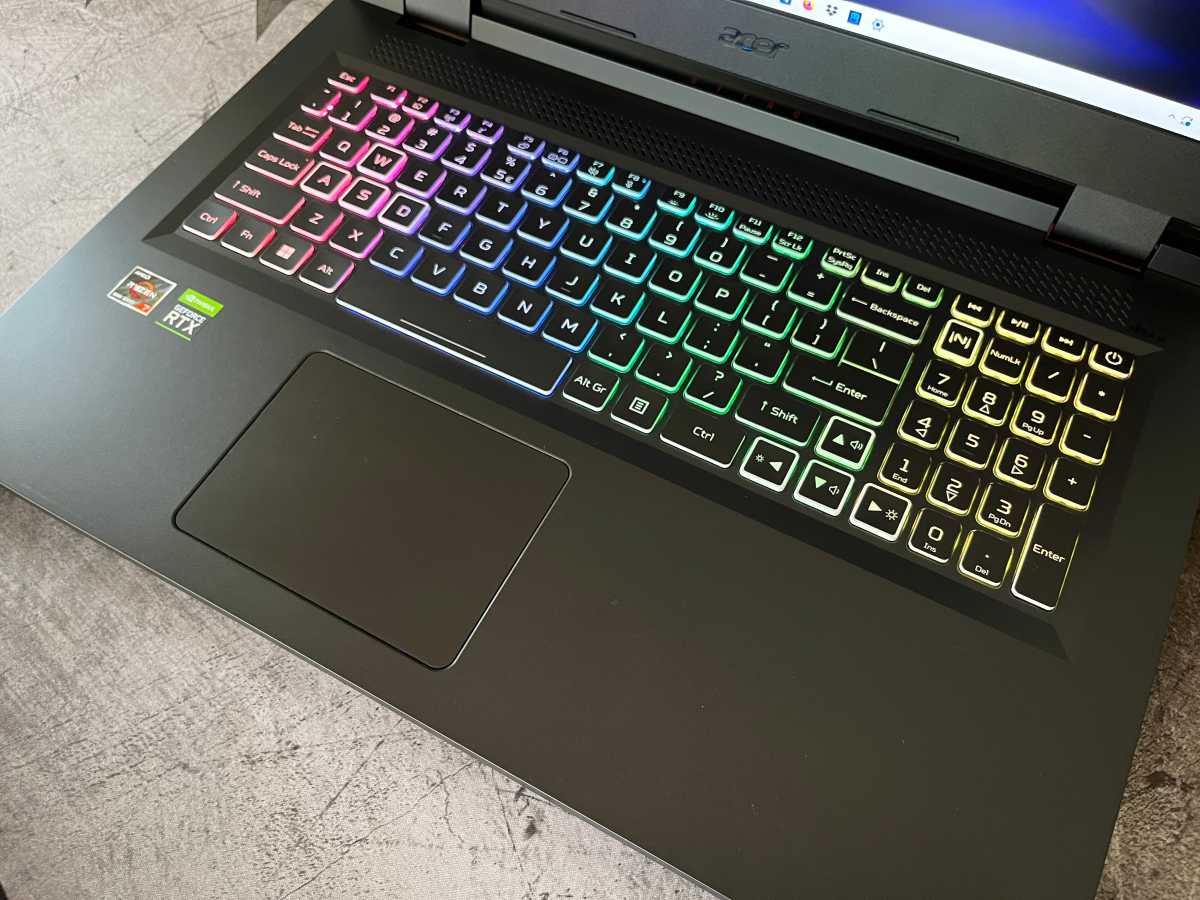
In addition to the sides of the keys, nine keys feature a white border on the top surface of the keycap. Eight of these keys are known to gamers: the four arrow keys and the WASD keys. The ninth key to get the white-border treatment is the “N” key above the numpad. It launches Acer’s NitroSense utility where you can adjust the laptop’s power mode and speed of the cooling fans. You can also customize the RGB keyboard backlighting across four zones. Pricier gaming laptops offer per-key lighting, but the four-zone keyboard lighting still allows for enough options to jazz up the look of the Nitro 5.
IDG / Matthew Elliott
The keys themselves offer a soft, quiet feel but they do wobble a bit if you hit them off-center. I wish the keys were a bit firmer and less mushy for a faster response. I also wish the touchpad were bigger. It looks comically small on the huge expanse that is the laptop’s wrist rest. Although undersized, the touchpad felt accurate with a firm, snappy click response.
IDG / Matthew Elliott
One benefit of a larger, bulkier chassis is the laptop’s cooling fans are leaned on less to keep thermals in check than they would be on a more compact enclosure. The Nitro 5 AN517’s fans kick in during games and other intensive graphics tasks and can clearly be heard, but they operate at a whisper during general Windows use.
Dim display, lousy speakers
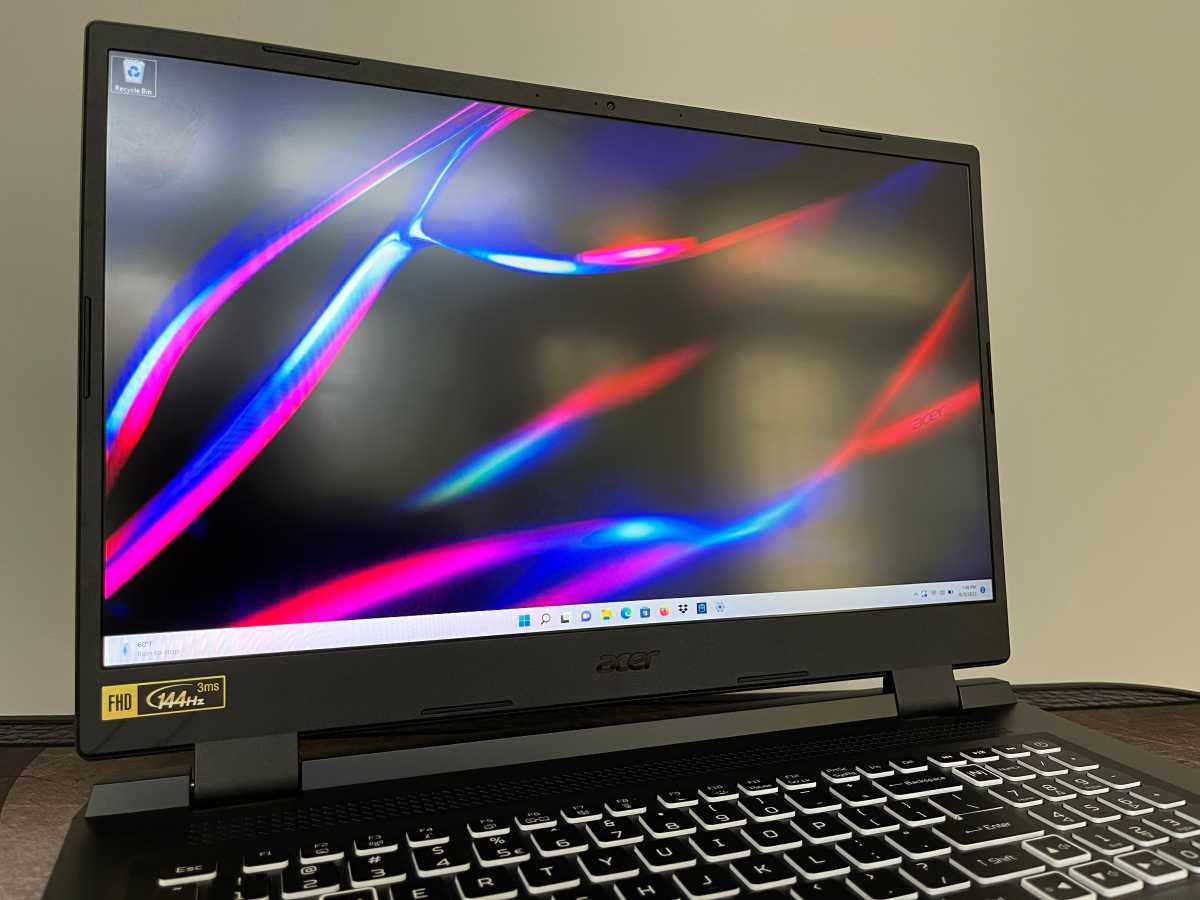
The Nitro 5 AN517 is based on a roomy, 17.3-inch 16:9 display. It’s available in either full HD (1920×1080) or QHD (2560×1440) resolution. Ours features the former, which suits the RTX 3060 GPU that is best for 1080p gaming. While you are unlikely to play games at a higher resolution with the midrange RTX 3060, the 1440p panel would make the laptop more versatile as the higher resolution creates a finer image for more detailed media editing and a larger workspace for juggling multiple windows when using the laptop for things other than gaming.
The 1080p is sufficient, however, for this size of panel, leaving the lackluster brightness as the display’s biggest flaw. It’s a rather dim display with dull colors that is best suited for gaming in a basement or other dark environment. In my office that receives some natural light, I had the display brightness set to its max at all times and often tapped the brightness-up button in a feeble attempt to increase it further.
IDG / Matthew Elliott
While many laptops have made the move to a 1080p webcam that results in clearly superior video conferencing, the Nitro 5 is stuck in the past with a mediocre-at-best 720p camera. It produces a grainy image with poor balance. Details are quickly lost in the brightest and darkest parts of the image. The camera that you will not want to use with any great frequency also lacks a privacy cover, which would protect you from prying eyes during the long stretches when it’s not in use.
Despite having room to outfit the system with four speakers, the Nitro 5 serves up only a pair of substandard stereo speakers. Without subwoofers to round out the sound, the audio output is decidedly subpar. Bass was all but nonexistent and the mids and high tones sounded muddied. Gamers, keep your headphones within reach.
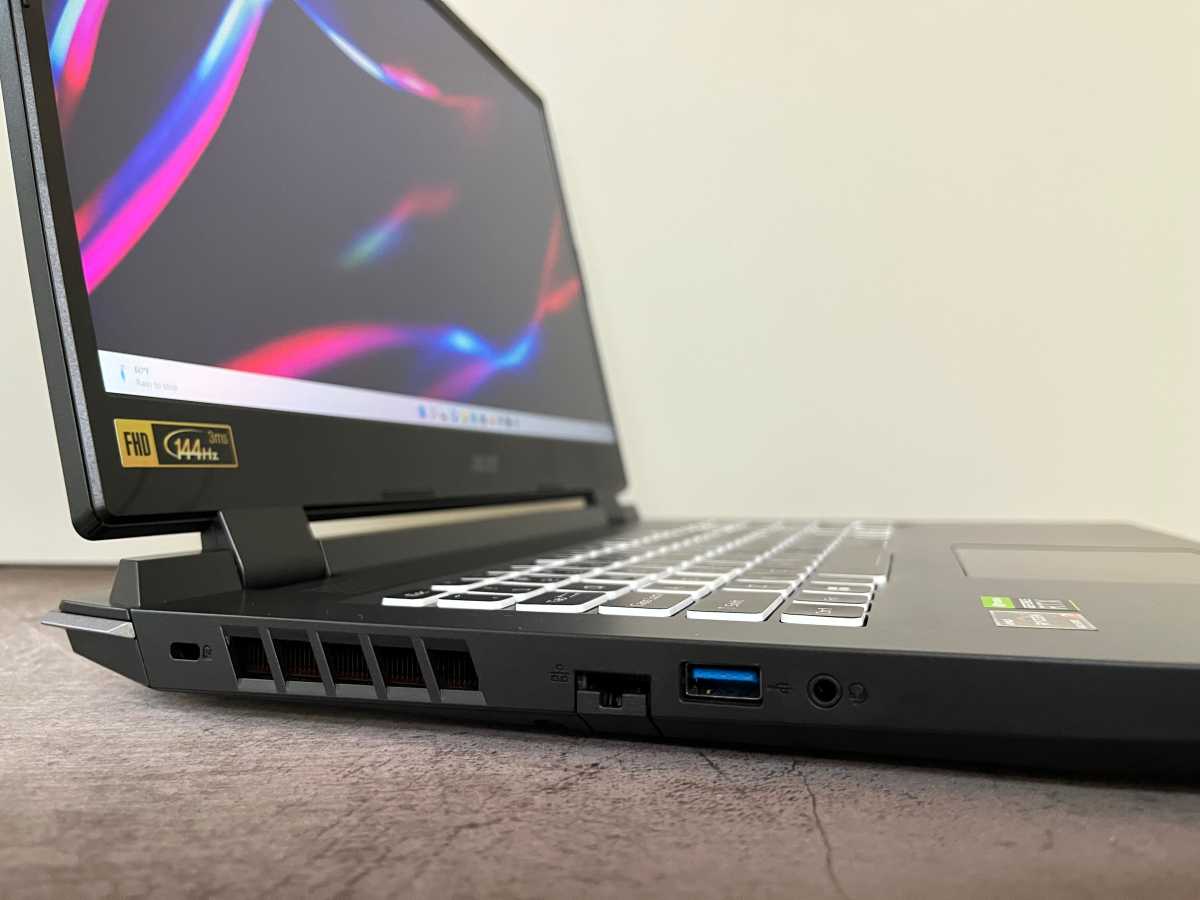
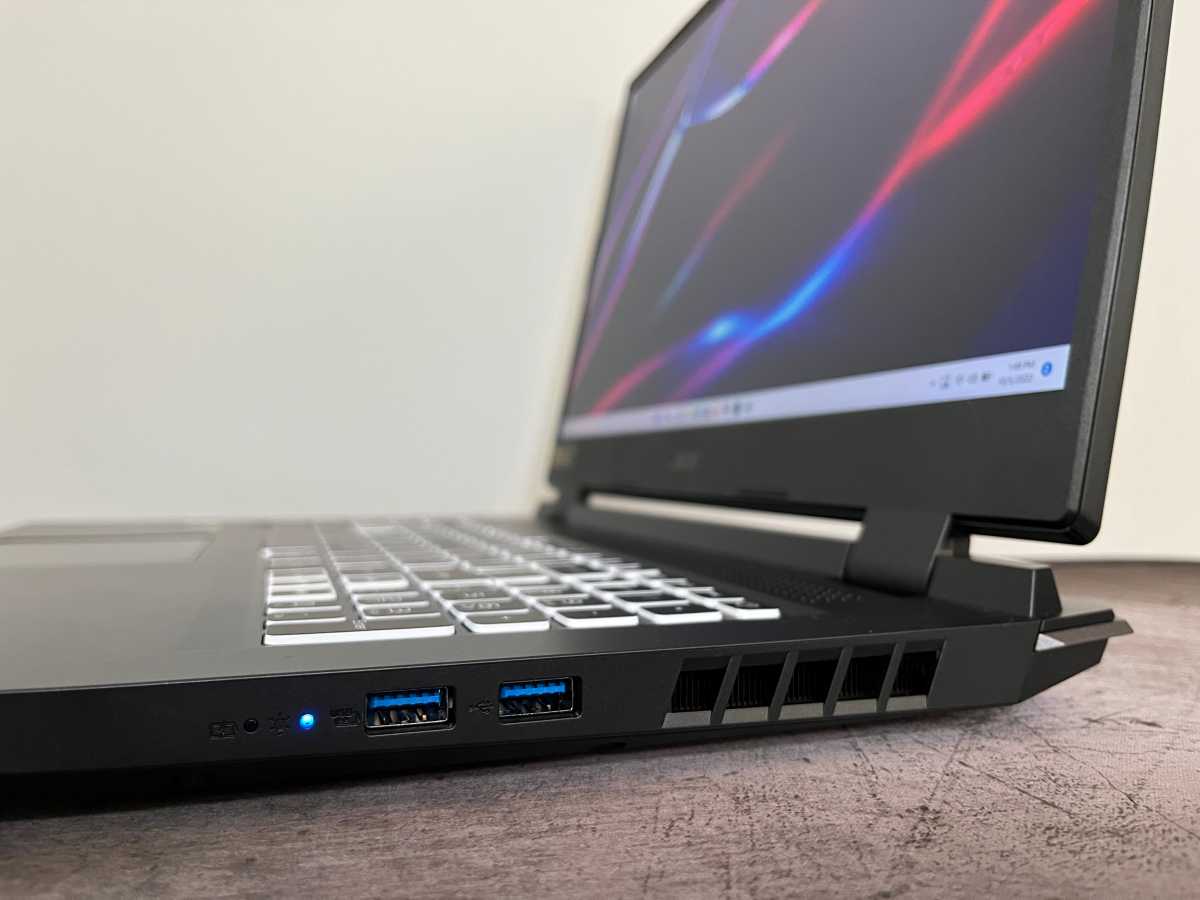
The port selection is heavy on USB Type-A ports and light on the Type-C variety, but at minimum it offers at least one of each type. There is a pair of USB-A ports on the right side and another on the left. Flanking the USB-A port on the left side is a headphone/mic jack and an Ethernet port.
IDG / Matthew Elliott
IDG / Matthew Elliott
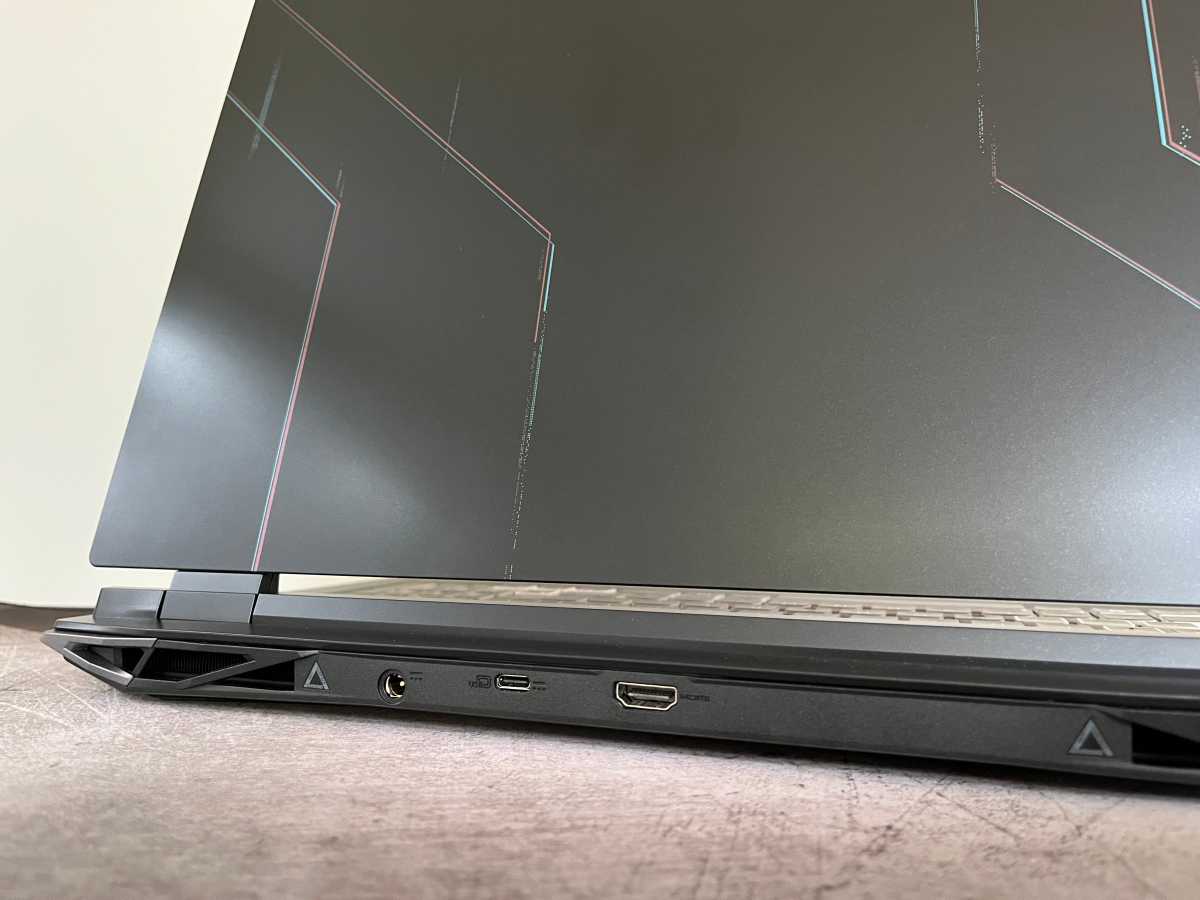
Where might the USB-C port be, you ask? Why, it’s on the back edge next to an HDMI port and the power connector. The USB-C port, however, does not include Thunderbolt support.
IDG / Matthew Elliott
The laptop’s 1TB SSD provides ample room to store your favorite games locally, and there’s a free M.2 slot should you want to expand your local storage with a second SSD. The system also features two DIMM slots, both of which are filled with 8GB sticks on our test system.
Performance
To put the Nitro 5 AN517’s performance into perspective, we pitted it against other gaming laptops with midrange RTX graphics, all of which feature Intel CPUs. The Acer Predator Triton 300 SE, Dell XPS 17 9720, and HP Victus 16 feature RTX 3060 graphics. Just below in the RTX pecking order is the RTX 3050 Ti-based MSI Katana GF76 while the Lenovo Legion 5 Pro is one notch above with RTX 3070.
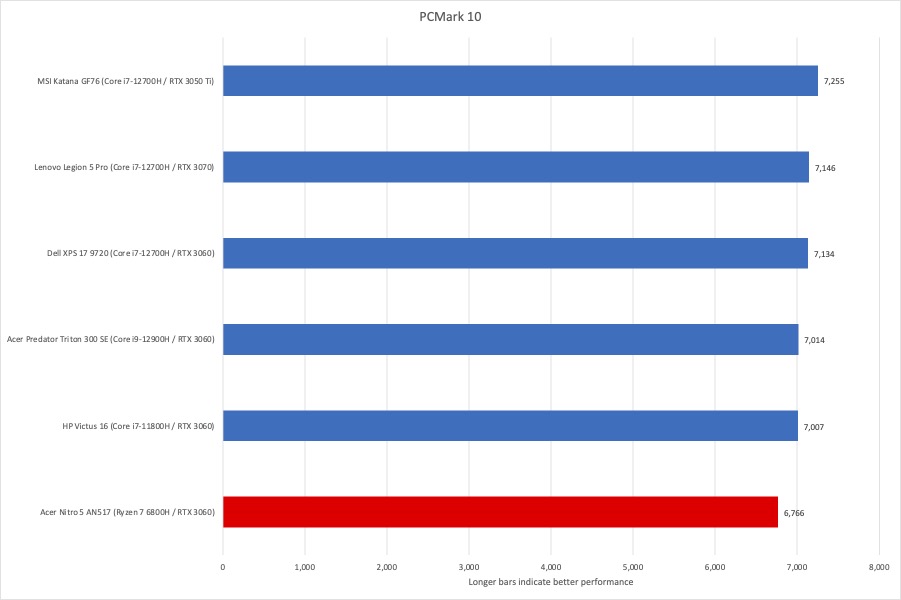
Before we get to the good stuff, we first run PCMark 10, which measures performance on everyday computing work including office productivity tasks, web browsing, and video chats. The Nitro 5 was unable to keep pace with its Intel competition, all of which crested the 7,000 mark. That said, all of the systems here — the Nitro 5 included — are overqualified for general Windows use. Anecdotally, the Nitro 5 felt peppy during a variety of multitasking scenarios with dozens and dozens of open Chrome tabs.
IDG / Matthew Elliott
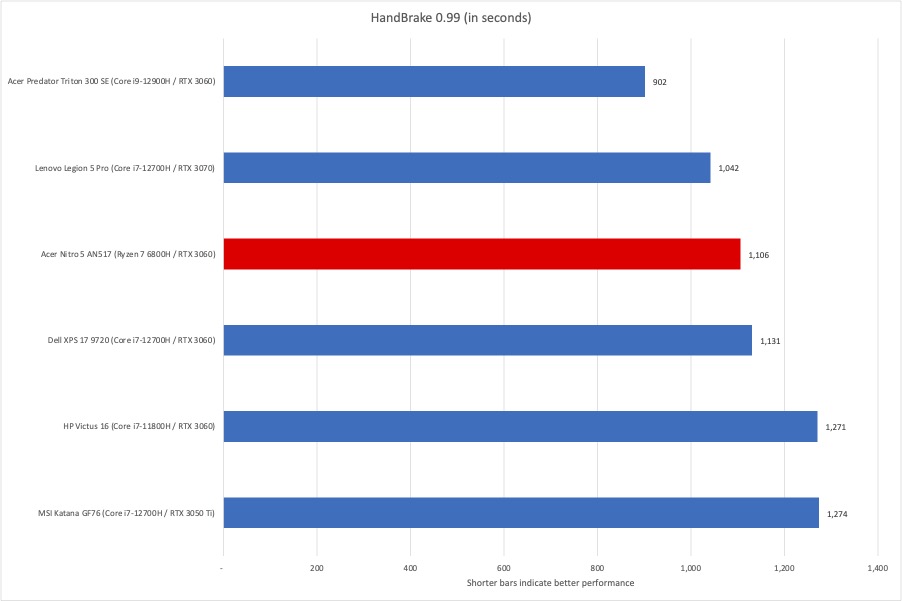
Our HandBrake benchmark tests how a laptop is able to handle crushing CPU loads over a lengthy period—in this case, transcoding a 30GB MKV file to a format suitable for Android tablets using HandBrake, the free video encoding utility. The Nitro 5 did better on HandBrake than PCMark, finishing in the middle of the pack and edging the Dell XPS 17, which features Intel’s high-powered Core i7-12700H and the same RTX 3060 GPU.
IDG / Matthew Elliott
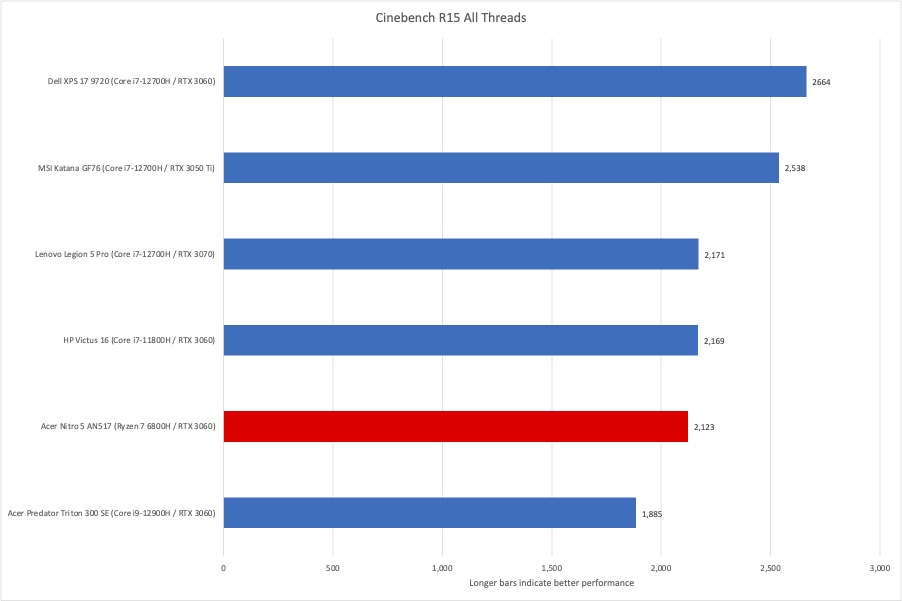
Next up is Cinebench, another CPU-intensive test but one that renders a complex 2D scene over a short period of time. The Nitro 5 was less competitive on Cinebench but did manage to stay out of last place.
IDG / Matthew Elliott
Graphics performance
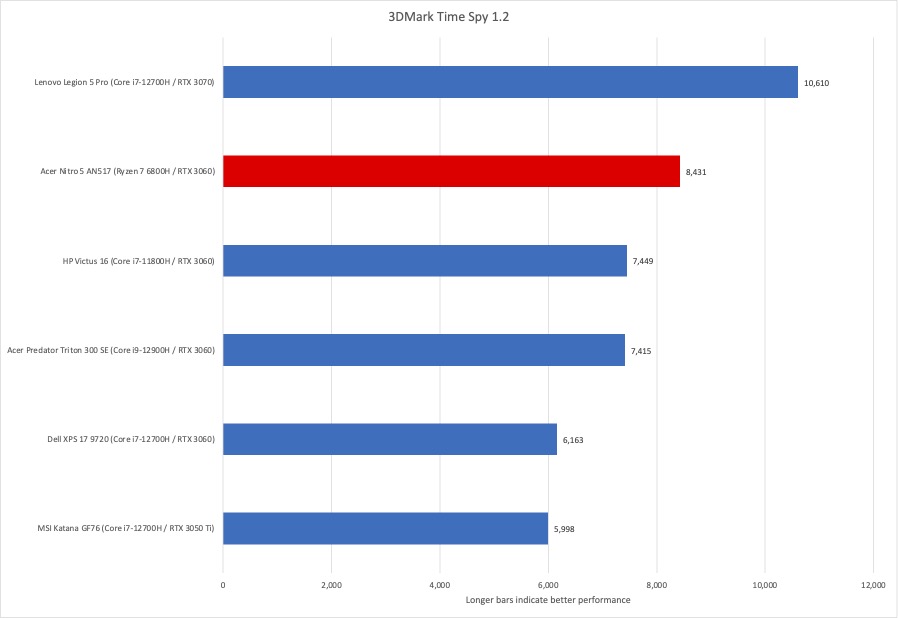
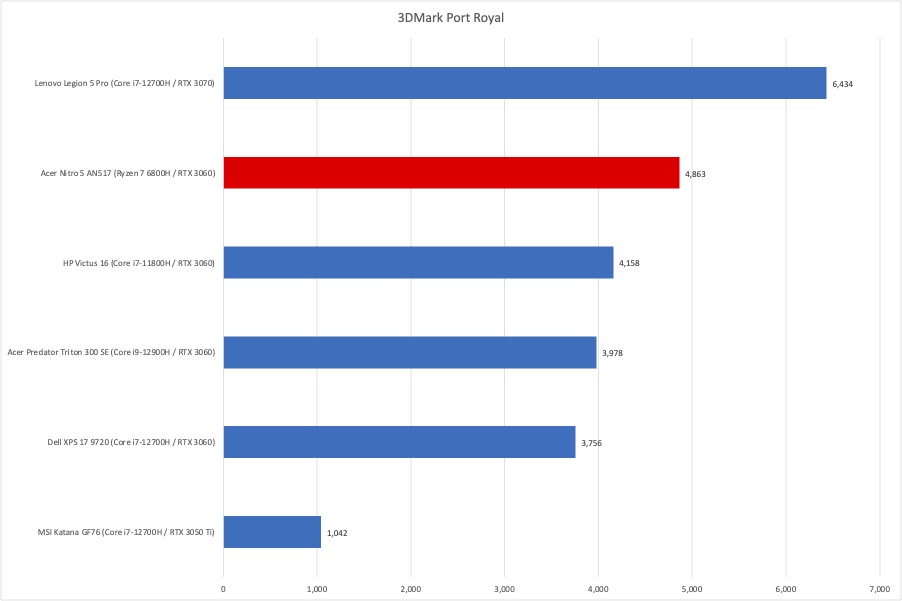
After assessing the machine’s application and multimedia performance, we have arrived at the good stuff — gaming performance. Before we get to the game themselves, we ran 3DMark’s Time Spy and Port Royal tests. The Nitro 5 did well on both tests, finishing first among the RTX 3060 systems and trailing only the RTX 3070-based Lenovo Legion 5 Pro.
IDG / Matthew Elliott
IDG / Matthew Elliott
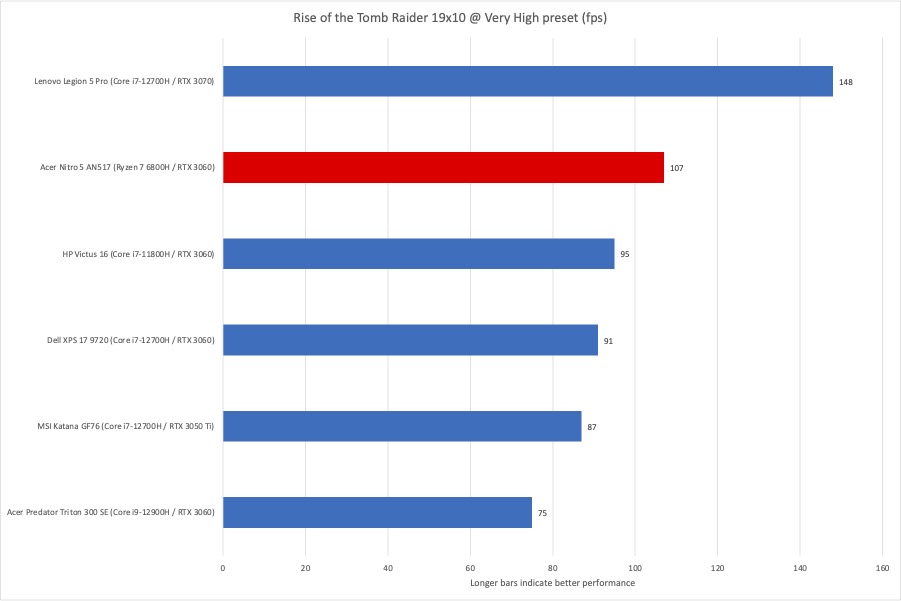
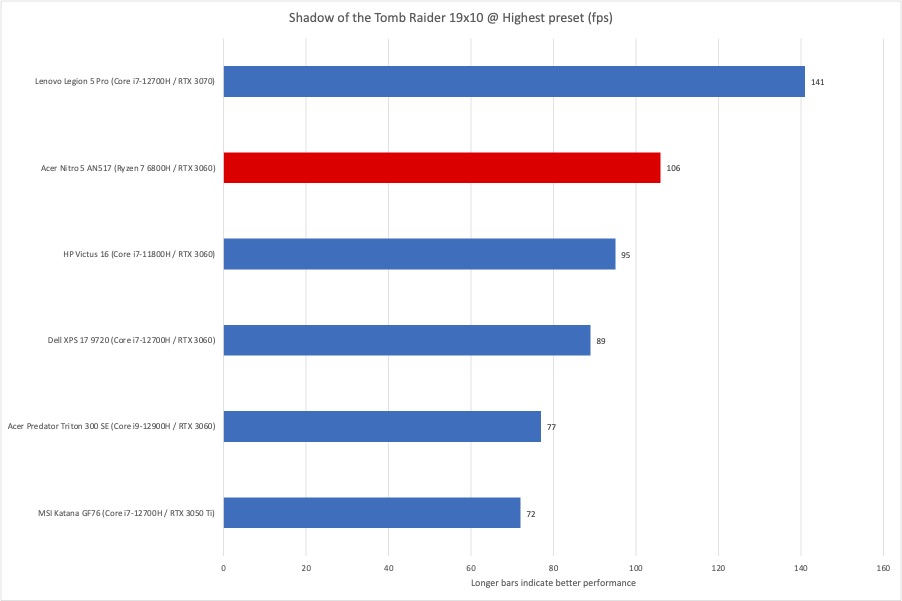
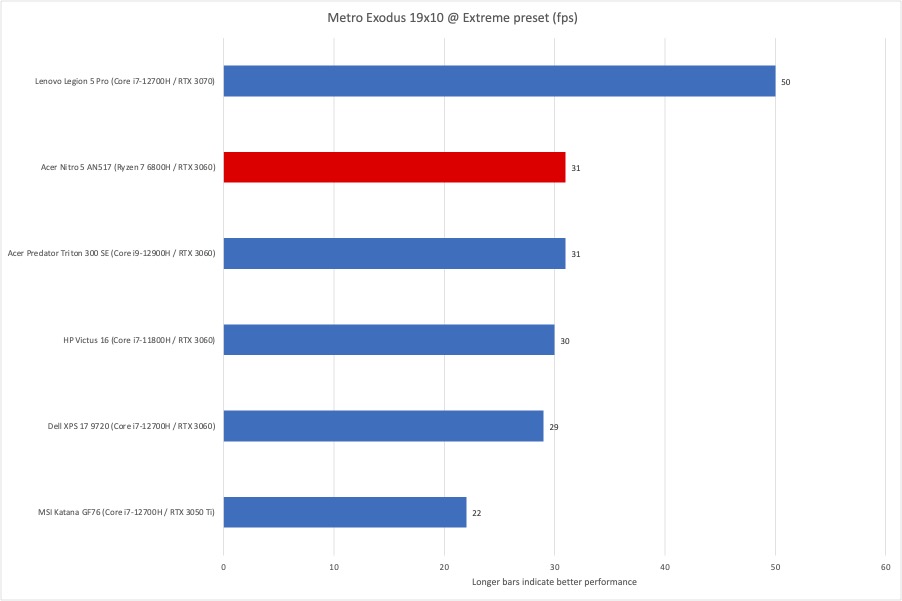
Moving on to real-world games, we first run Rise of the Tomb Raider at 1920×1080 resolution set to Very High and in DX11 mode. The Nitro 5 turned in a very playable framerate of 107 fps and was again at the head of the RTX 3060 pack. On the newer Shadow of the Tomb Raider at 1920×1080 resolution, the Nitro 5 averaged an impressive 106fps, which was again first among the RTX 3060 laptops. Finally, on the more demanding Metro Exodus at 1920×1080 at the benchmark’s Extreme preset, the Nitro 5 averaged 31fps, which was right in line with the other RTX 3060 laptops and behind the 50 fps of the RTX 3070-based Lenovo Legion 5 Pro.
IDG / Matthew Elliott
IDG / Matthew Elliott
IDG / Matthew Elliott
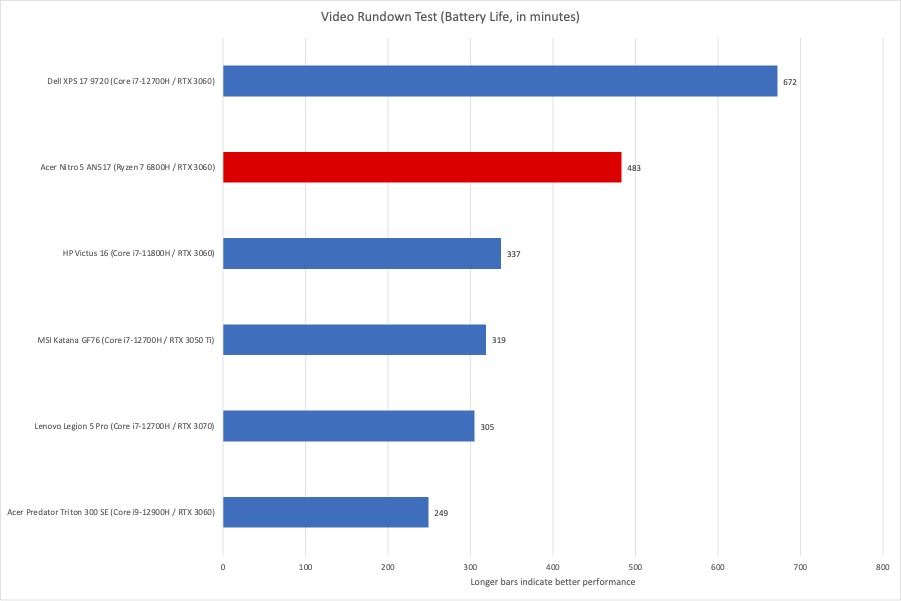
To test a laptop’s battery life, we loop a 4K video using Windows 11’s Movies & TV app, with the laptop set to Airplane mode and earbuds plugged in. We set the screen brightness at a relatively bright 250 nits to 260 nits, which is a good brightness for watching a movie in an office with the lights on. The Nitro 5’s huge 96 watt-hour battery lasted 8 hours and change on our battery rundown test, an impressive result for such a large-screened laptop.
IDG / Matthew Elliott
Capable budget gamer
As you have just read (unless you skipped to the end), the Acer Nitro 5 AN517 is not without its faults. But every budget laptop makes a few missteps and none of our issues with this 17.3-inch Nitro 5 are deal breakers. Sure, the plastic chassis is clunky, the display isn’t the brightest, the keyboard is only so-so, the touchpad is tiny, and the webcam is terrible. These design drawbacks are what you must tolerate for the bang that this Nitro 5 provides for your gaming buck. At its core, the Nitro 5’s CPU-GPU pairing of the Ryzen 7 6800H and RTX 3060 graphics allow it to hang with pricier gaming laptops. For budget-conscious buyers, this $1,200 Nitro 5 configuration delivers strong 3D performance for the price while also providing a roomy display, quiet operation, and adequate battery life.