Skip to content
Fri. Dec 5th, 2025
  • Facebook
  • Twitter
  • Instagram
  • Youtube
  • VK
  • Whatsapp

Tech News

Technology News,iPhone Reviews,iPad Reviews

Primary Menu
  • Home
  • NEWS
  • AccessoriesBlocks
  • Insider
  • PodcastExclusive
  • APPS
  • HOW TOS
  • Daily Tips
  • Headlines
  • Home
  • It’s time for Windows to copy Apple’s built-in text expander
  • Editor's Choice

It’s time for Windows to copy Apple’s built-in text expander

3 min read

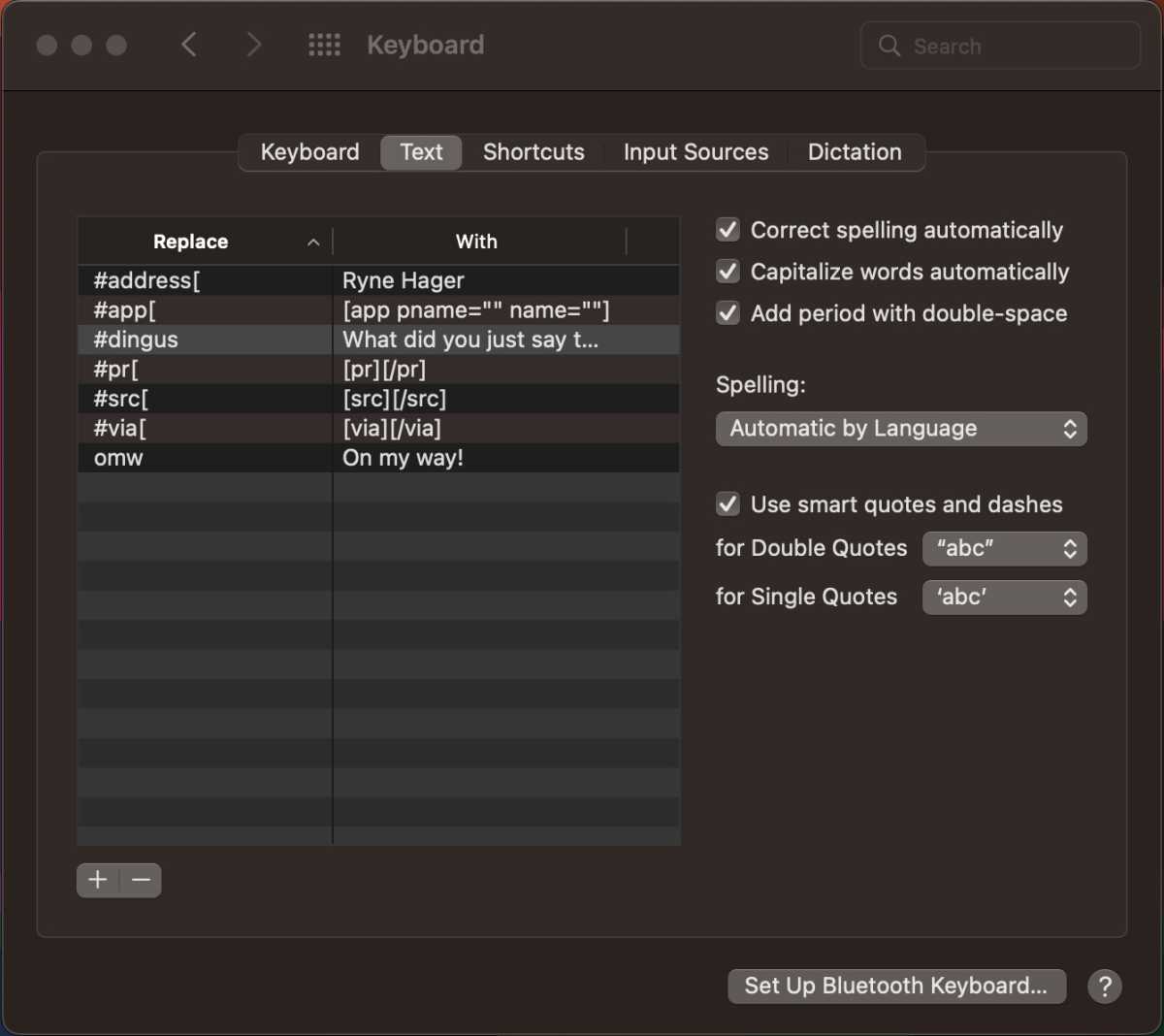
A few keystrokes might not seem like a lot, but they add up over time. That’s why text expanders can be a major productivity boost, allowing you to create shortcuts for commonly used phrases across your computer. There are numerous programs that do this on Windows, some of which have been around since the 20th century, but Apple added its own text expander feature in macOS more than a decade ago. It’s long past time for Microsoft to add the same functionality to Windows.

Saving keystrokes, saving time
Text expander

Macros and shortcuts save a lot of time and help with productivity.

Brad Chacos

Anyone who spends a lot of time typing can benefit hugely from a text expander, sometimes called “text replacement.” Instead of typing the same long string of text over and over, you can use these programs to create a shortcut. For example, instead of typing out your address, you could set a shortcut consisting of a few keystrokes like “myadr.” Simply peck out those keys, and your expander will insert the programmed text. Text expansion is also handy for quick access to special characters that are a pain to access on most systems. 

Depending on how repetitive your text input gets, you might fire off shortcuts on a regular basis, and that adds up. A few seconds here and there becomes significant over the days and weeks. Most of the popular text expanders for Windows include stats that show you how much time they save—the one I use claims it has saved me over an hour of typing time in the last several months. 

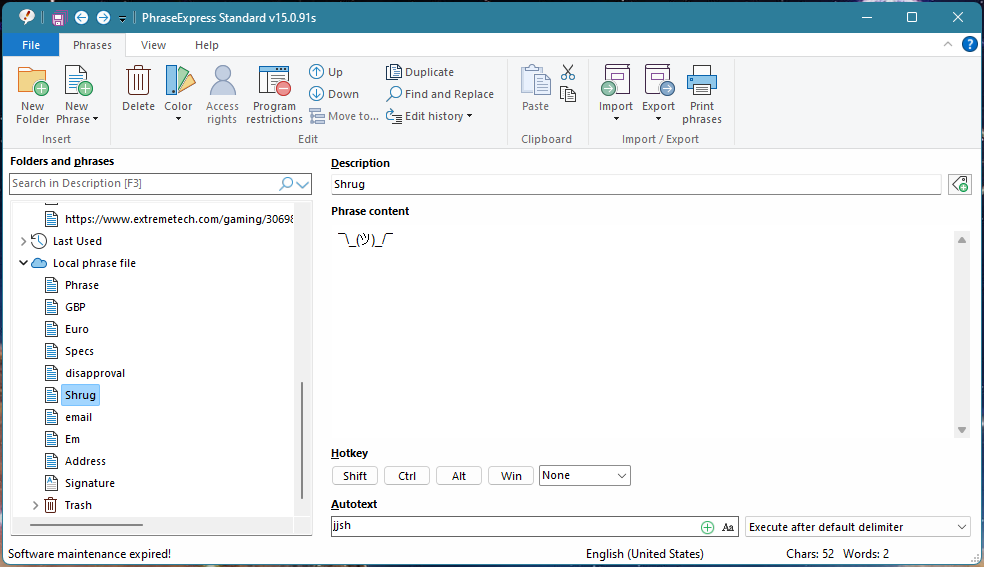
Some of the myriad text expanders for Windows are free, but the most powerful ones cost money. These programs—like PhraseExpress, TextExpander, and FastFox—include advanced options like date insertion, macros, formatting, database input, and more. They are powerful tools that can automate many tasks on your computer, provided you have the patience to set them up.
Text expander

Programs like PhraseExpress Standard offer what Microsoft should be offering for free.

Brad Chacos

For some people, the cost of these programs is worth it, but not everyone needs the advanced features. Something like the macOS text replacement tool is a great place to start. It just supports plain text insertion, along with a few basic corrections like adding a period in place of a double space. Windows really should have a version of this tool, and not only as a gateway to more powerful third-party solutions.

A question of privacy

There’s a notable drawback of text expanders that will keep some people from ever installing one: they see everything you type. That’s how these apps know to fire off one of your programmed shortcuts, and many also have clipboard integration, so they can see what you copy, too. The more privacy-minded will never accept the potential security implications of giving a closed-source app that much control, and it’s hard to blame them. 

That’s not to say any of the established players are actively doing anything disreputable, but the internet is a big place. Why go to all the trouble of running background checks on developers to establish trust when you’re already using an operating system that knows everything you’re doing? The OS can, and should, offer a simple feature like text expansion. Apple does, and Microsoft should as well. 

A properly integrated text expander in Windows would provide a more secure way to save those keystrokes. Windows underpins the entire computing experience on PCs, so you have to implicitly trust it to access your personal data. You don’t lose any measure of privacy by also using Windows to modify your text input as you type. 

Apple hasn’t done much to improve its text replacement feature over the years, but Microsoft could do better in 2022. It would be trivially easy to support plain text, formatting, and some of the more basic features you get in third-party apps—plus, Windows already has a built-in clipboard manager, which is a core part of most text expanders. Microsoft recently released the big 2022 Windows 11 update, but the company is no longer locking itself into a set schedule. Now, it will add new features to Windows whenever the need arises. The first of these “continuous innovation” updates will arrive soon in the form of tabbed File Explorer support. A future update really ought to add a text expander—it’s a no-brainer.
Tags: Apples builtin copy expander Text Time Windows

Continue Reading

Previous: How an AI trained to read scientific papers could predict future discoveries
Next: Asus ProArt PA348CGV review: A do-it-all ultrawide wonder

Related Stories

best-budget-laptops-1.jpg Best laptops 2025: Premium, budget, gaming, 2-in-1, and more 14 min read
  • Editor's Choice

Best laptops 2025: Premium, budget, gaming, 2-in-1, and more

MS-Project.jpg If you’re working with complex projects, this $15 app makes them much simpler 1 min read
  • Editor's Choice

If you’re working with complex projects, this $15 app makes them much simpler

Netflix-Hintergrund-1.jpg Best VPN for streaming Netflix 2025: Best overall, cheap, free, and for travelers 14 min read
  • Editor's Choice

Best VPN for streaming Netflix 2025: Best overall, cheap, free, and for travelers

KDE-Plasma-Desktop-screenshot-promo-1.jpg Don’t toss your Windows 10 PC! Try switching to KDE Plasma instead 2 min read
  • Editor's Choice

Don’t toss your Windows 10 PC! Try switching to KDE Plasma instead

snipping_tool_in_windows-1.jpg Windows 11’s Snipping Tool now creates DIY animated GIFs 2 min read
  • Editor's Choice

Windows 11’s Snipping Tool now creates DIY animated GIFs

pexels-alscre-3977908.jpg Hundreds of Minecraft mods on GitHub are infested with hard-to-spot spyware 2 min read
  • Editor's Choice

Hundreds of Minecraft mods on GitHub are infested with hard-to-spot spyware

AFTK Social

  • Facebook
  • Twitter
  • Instagram
  • Youtube
  • VK
  • Whatsapp
  • Latest
  • Popular
  • Trending
  • best-budget-laptops-1.jpg Best laptops 2025: Premium, budget, gaming, 2-in-1, and more
    • Editor's Choice

    Best laptops 2025: Premium, budget, gaming, 2-in-1, and more

  • MS-Project.jpg If you’re working with complex projects, this $15 app makes them much simpler
    • Editor's Choice

    If you’re working with complex projects, this $15 app makes them much simpler

  • Netflix-Hintergrund-1.jpg Best VPN for streaming Netflix 2025: Best overall, cheap, free, and for travelers
    • Editor's Choice

    Best VPN for streaming Netflix 2025: Best overall, cheap, free, and for travelers

  • KDE-Plasma-Desktop-screenshot-promo-1.jpg Don’t toss your Windows 10 PC! Try switching to KDE Plasma instead
    • Editor's Choice

    Don’t toss your Windows 10 PC! Try switching to KDE Plasma instead

  • snipping_tool_in_windows-1.jpg Windows 11’s Snipping Tool now creates DIY animated GIFs
    • Editor's Choice

    Windows 11’s Snipping Tool now creates DIY animated GIFs

  • best-budget-laptops-1.jpg Best laptops 2025: Premium, budget, gaming, 2-in-1, and more
    • Editor's Choice

    Best laptops 2025: Premium, budget, gaming, 2-in-1, and more

  • Meet Jo Jo, Body Positive Model and Cousin of Gigi
    • Headlines

    Meet Jo Jo, Body Positive Model and Cousin of Gigi

  • Finland’s Down’s model Maija makes strides on catwalk
    • Headlines

    Finland’s Down’s model Maija makes strides on catwalk

  • How to Create Adjustment Layers Based on Color
    • NEWS

    How to Create Adjustment Layers Based on Color

  • If You Have $5, Zendaya Found the Spring Collections
    • NEWS

    If You Have $5, Zendaya Found the Spring Collections

  • 5e90465d671ab.jpg Facebook plugs booming business version into Portal
    • ACCESSORIES

    Facebook plugs booming business version into Portal

  • 5e904636599e6.jpg Sony's PlayStation 5 launch set for late 2020
    • ACCESSORIES

    Sony's PlayStation 5 launch set for late 2020

  • 5e90460c39823.jpg Epic Games sued for not warning parents 'Fortnite' is allegedly as addictive as cocaine
    • ACCESSORIES

    Epic Games sued for not warning parents 'Fortnite' is allegedly as addictive as cocaine

  • 5e90459eaad1d.jpg Boeing reports another big drop in deliveries in 3Q
    • ACCESSORIES

    Boeing reports another big drop in deliveries in 3Q

  • 5e90457922df5.jpg New approach for modern power grids that increases efficiency, reduces cost
    • ACCESSORIES

    New approach for modern power grids that increases efficiency, reduces cost

Protect your privacy

Tech News List

Qualcomm-Snapdragon-4s-Gen2.jpg 5 min read New Qualcomm Chip Set To Supercharge Affordable 5G Phones
  • NEWS

New Qualcomm Chip Set To Supercharge Affordable 5G Phones

reading-online.jpg 5 min read ‘Pink Slime’ Websites Outnumber Daily Newspapers on the Internet
  • NEWS

‘Pink Slime’ Websites Outnumber Daily Newspapers on the Internet

Apple-Intelligence-WWDC24.jpg 5 min read Apple Goes All-In on a Privacy-Based AI Experience
  • NEWS

Apple Goes All-In on a Privacy-Based AI Experience

Tim-Cook-WWDC24.jpg 6 min read Apple Outdoes Google and Microsoft in AI Rollout
  • NEWS

Apple Outdoes Google and Microsoft in AI Rollout

ewaste-computers.jpg 5 min read Windows 10 End of Life Could Bury Landfills in E-Waste
  • NEWS

Windows 10 End of Life Could Bury Landfills in E-Waste

Categories

  • ACCESSORIES
  • APPS
  • DAILY TIPS
  • Editor's Choice
  • Headlines
  • HOW TOS
  • INSIDER
  • NEWS
  • PODCAST

Recent Posts

  • Best laptops 2025: Premium, budget, gaming, 2-in-1, and more
  • If you’re working with complex projects, this $15 app makes them much simpler
  • Best VPN for streaming Netflix 2025: Best overall, cheap, free, and for travelers
  • Don’t toss your Windows 10 PC! Try switching to KDE Plasma instead
  • Windows 11’s Snipping Tool now creates DIY animated GIFs

You may have missed

best-budget-laptops-1.jpg Best laptops 2025: Premium, budget, gaming, 2-in-1, and more 14 min read
  • Editor's Choice

Best laptops 2025: Premium, budget, gaming, 2-in-1, and more

MS-Project.jpg If you’re working with complex projects, this $15 app makes them much simpler 1 min read
  • Editor's Choice

If you’re working with complex projects, this $15 app makes them much simpler

Netflix-Hintergrund-1.jpg Best VPN for streaming Netflix 2025: Best overall, cheap, free, and for travelers 14 min read
  • Editor's Choice

Best VPN for streaming Netflix 2025: Best overall, cheap, free, and for travelers

KDE-Plasma-Desktop-screenshot-promo-1.jpg Don’t toss your Windows 10 PC! Try switching to KDE Plasma instead 2 min read
  • Editor's Choice

Don’t toss your Windows 10 PC! Try switching to KDE Plasma instead

Recent Posts

  • Best laptops 2025: Premium, budget, gaming, 2-in-1, and more
  • If you’re working with complex projects, this $15 app makes them much simpler
  • Best VPN for streaming Netflix 2025: Best overall, cheap, free, and for travelers
  • Don’t toss your Windows 10 PC! Try switching to KDE Plasma instead
  • Windows 11’s Snipping Tool now creates DIY animated GIFs
  • Hundreds of Minecraft mods on GitHub are infested with hard-to-spot spyware
  • This 1440p OLED gaming monitor is just $500 today
  • Best budget gaming laptops 2025: Top affordable picks for performance
  • Airrobo PC10 robotic pool cleaner review: An effective low-budget cleaning option
  • Intel teases huge leaps for 18A, the tech behind its next-gen CPUs

Search

Tags

AI Air App Apple Apps artificial Battery Beta Boeing Data Disable Download Enable EU Facebook FaceTime Fix Free gaming Google iOS iPad iPhone Laptop Mac MacOS Media Microsoft Mode Mojave Pro Released Researchers Screen Social Store Surface Tech Testing Tips top Update Video Windows world

Tech Gallery

  • Home
  • About
  • Blog
  • Contact
  • Facebook
  • Twitter
  • Instagram
  • Youtube
  • VK
  • Whatsapp
Copyright © All rights reserved. | WPfastworld