
Asus ProArt PA348CGV review: A do-it-all ultrawide wonder
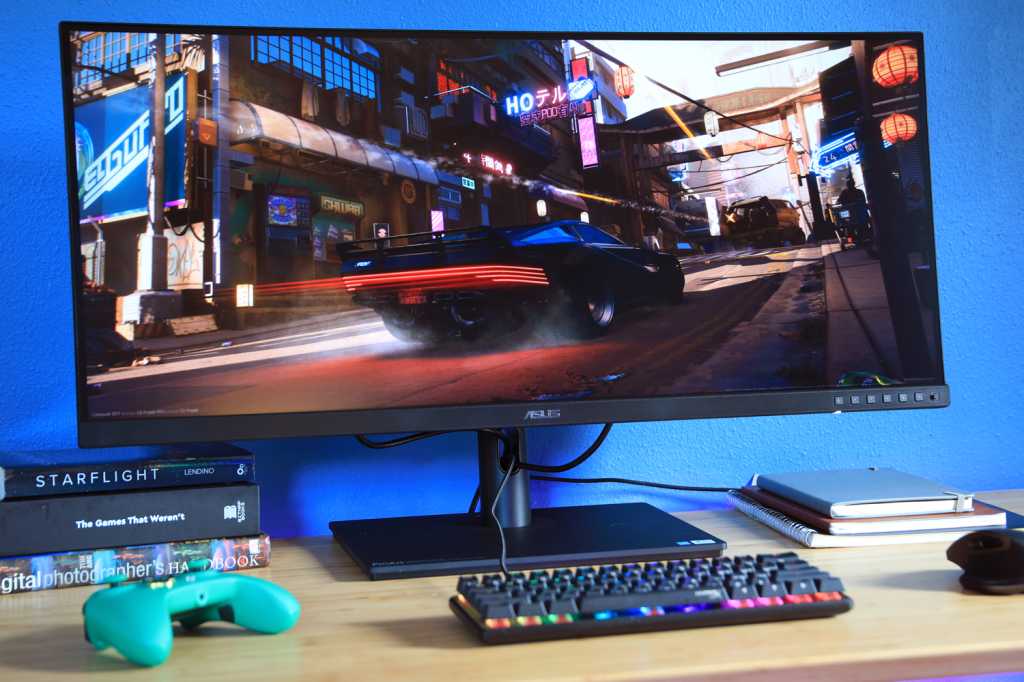
 At a glance
Expert’s Rating
Pros
- Excellent SDR image quality
- Sturdy, hefty design
- Wide range of customization
- 120Hz refresh rate
Cons
- USB-C hub lacks video-out or ethernet
- HDR is merely passable
Our Verdict
The Asus ProArt PA348CGV blends professional image quality with gamer-friendly features to create an impressively versatile and capable display. The price might make some pause, but if you want a monitor that can competently handle anything you throw at it, then it doesn’t get much better than this.
Price When Reviewed
729.99
Best Prices Today: Asus ProArt PA348CGV

$729.99

$729.99
Content creators who play PC games face tough choices when it comes time to buy a monitor. Many of the best professional monitors look great in games but lack a high refresh rate and adaptive sync. Gaming monitors, on the other hand, can have great image quality but are missing features essential to demanding creators. Asus ProArtPA34CGV bridges this gap, and does so at a reasonable price.
Note: This review is part of our ongoing roundup of the best monitors. Go there for information about competing products, what to look for in a monitor, and buying recommendations.
Asus ProArt PA348CGV: The specs
The Asus ProArt PA348CGV’s specifications are typical of a 34-inch ultrawide monitor. Its resolution of 3440×1440 is essentially the standard for this size of monitor, with only a couple LG 5K Ultrafine monitors going higher. The IPS panel is also typical for this category.
- Display size: 34-inch ultrawide
- Native resolution: 3440×1440
- Panel type: IPS
- Refresh rate: 120Hz
- HDR: Yes
- Ports: 1x USB-C 90W Power Delivery, DisplayPort 1.4, 2x HDMI 2.0, 4x USB 3.2, earphone jack
- Stand adjustment: Height, tilt, swivel
- VESA mount: 100x100mm
- Speakers: Yes
- Price: $729
As a result, it’s easy to underestimate the PA348CGV. This monitor’s strengths aren’t clearly expressed by its specifications but quickly became obvious in my testing.
Asus ProArt PA348CGV: Design
The Asus ProArt PA348CGV is a monitor meant for professional use and, as such, has a restrained design that doesn’t stand out—especially from the front, where moderately sized matte-black bezels frame the screen. It’s a bit more attractive from the rear thanks to a series of heatsink-like ridges, but still tame.
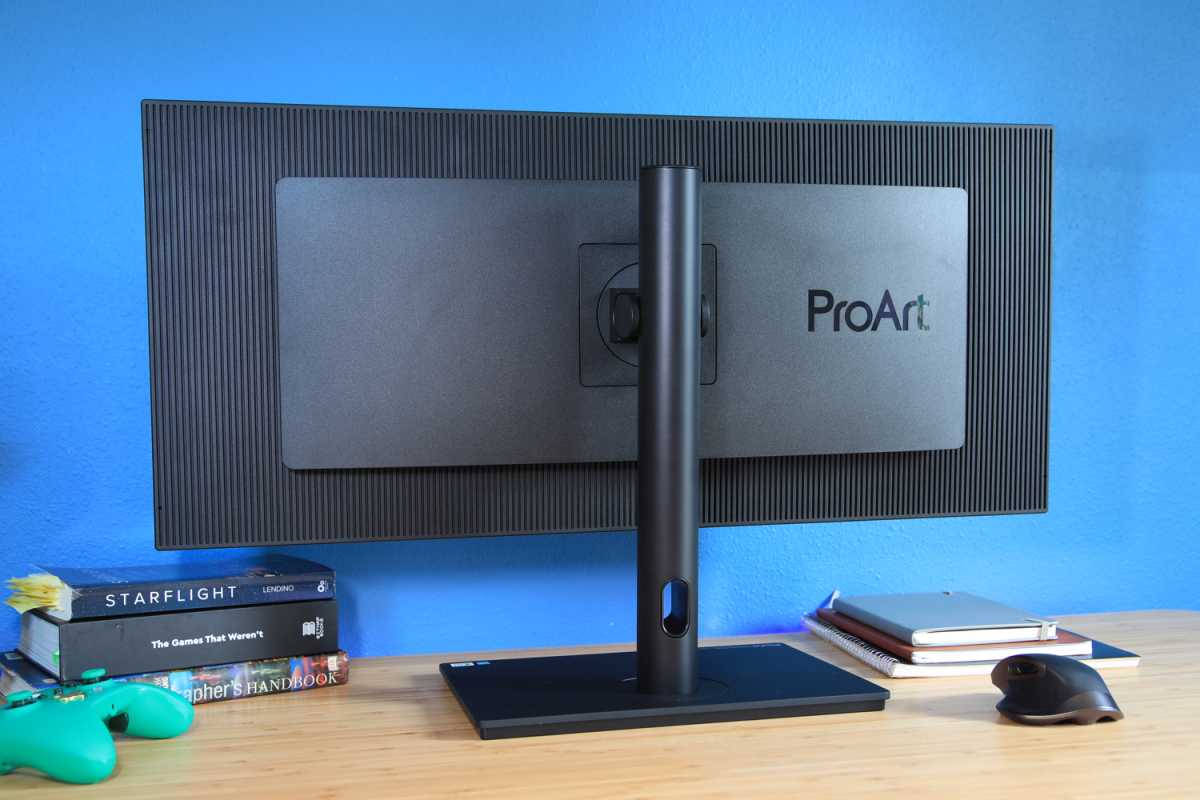
The Asus ProArt PA348CGV’s design is a bit tame, but functional nonetheless.
Matt Smith
Pick it up, however, and the monitor is more impressive. This is a beefy display with thick, sturdy plastics and a remarkably weighty stand sure to keep it steady. The stand’s design includes a modestly sized, flat base that minimizes its footprint on your desktop.
The stand can adjust for height, swivel, and tilt. Those who need more range of motion can attach a third-party monitor stand or arm to the 100x100mm VESA mount. A word of warning: The panel alone weighs about 17 pounds, which tests the limits of inexpensive Amazon monitor arms. You’ll have to budget for a better monitor arm from Ergotron, Jarvis, or similar.
Asus ProArt PA348CGV: Features and menu
The Asus ProArt PA348CGV has a reasonable range of modern connectivity. This includes one USB-C port with 90 watts of Power Delivery and DisplayPort Alternate mode. That port can extend connectivity to four additional USB-A 3.2 ports. The monitor lacks ethernet or DisplayPort-Out, however, making it less useful than Dell’s best USB-C hub monitors such as the Dell U3421WE.
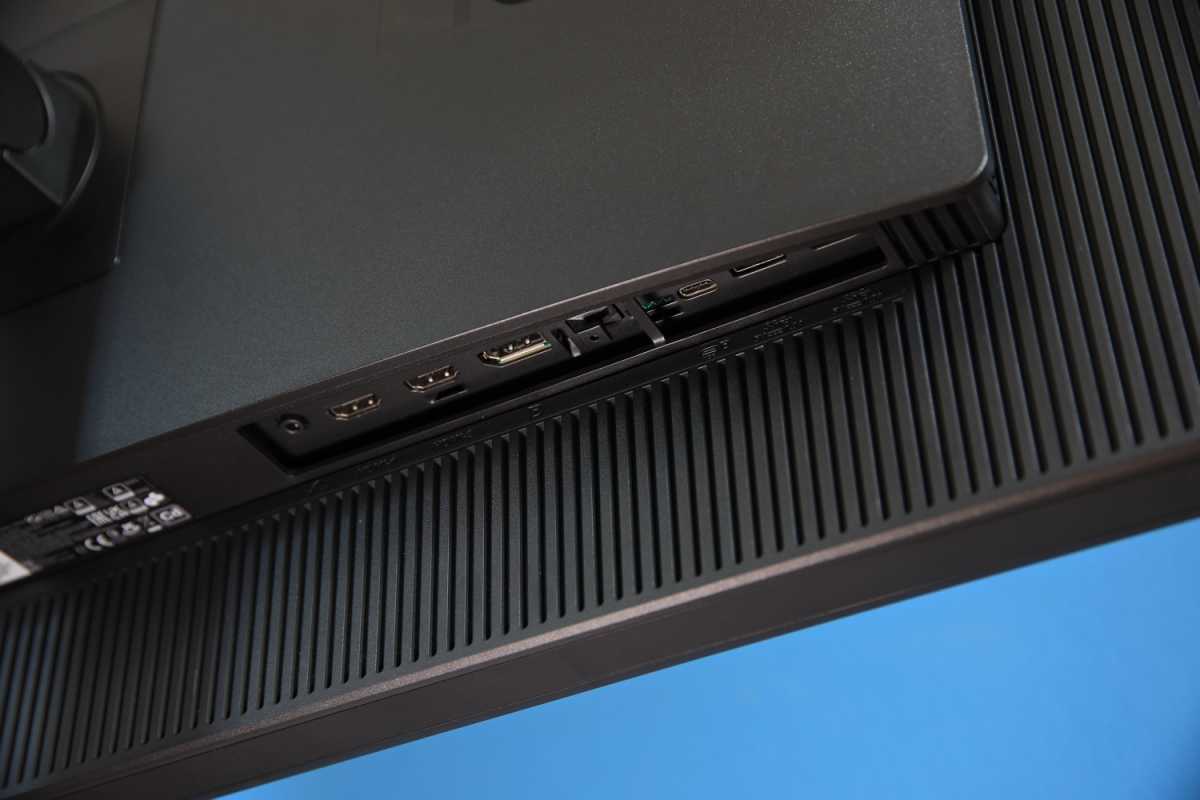
The port range on the Asus ProArt PA348CGV is reasonable.
Matt Smith
Additional video inputs include one DisplayPort 1.4 and two HDMI 2.0, for a total of four video inputs. There’s also a 3.5mm earphone jack for passing through audio.
The monitor’s menus are controlled by a joystick and series of front buttons. Placing the joystick up front is not the common choice but makes it easy to find, and the buttons allow access to a variety of shortcuts like brightness or blue light controls. The menus look great, have clear labels, and respond quickly to input.
There’s no shortage of preset image-quality modes which, importantly, include sRGB, Rec.709, and DCI-P3. That’s key for content creators who want to work in a very specific color space.
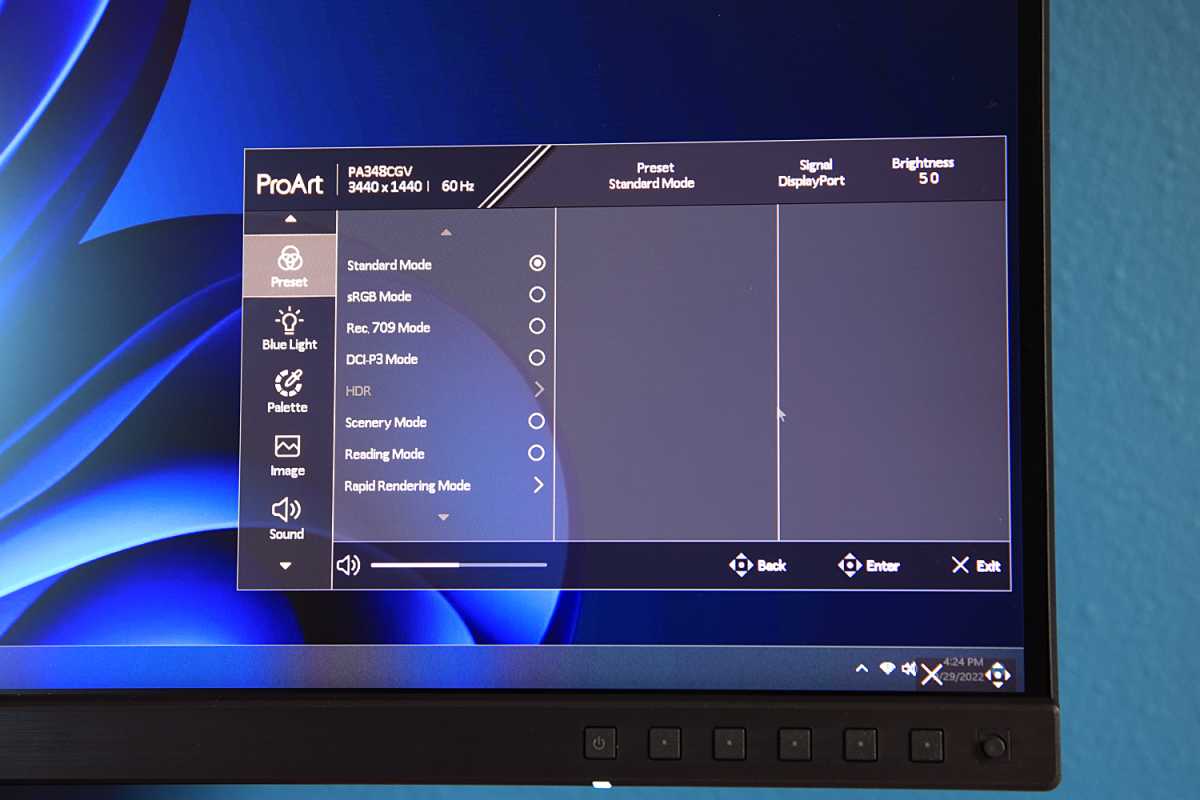
Great customization options are included in an easy-to-use menu system on the Asus ProArt PA348CGV.
Matt Smith
Customization is extensive, as well. The monitor offers four precise color temperature modes and five precise gamma modes. There’s also six-axis color hue and saturation adjustment, plus gain and offset. These options help creators dial in the image to match their needs. The monitor includes speakers, which is nice, but they’re weak and only usable at (or very near) maximum volume. They are useful in a pinch, and for basic audio notifications, but don’t hold up in music, movies, or games. Those who need quality audio in a monitor should look at alternatives from BenQ like the EW3880R.
Asus ProArt PA348CGV: SDR image quality
The Asus ProArt PA348CGV’s specifications don’t offer much reason for excitement, as it lacks flashy new technologies like Quantum Dots, a Mini-LED backlight, or an OLED panel. Yet the monitor manages to impress with solid brightness and excellent color accuracy.
Matt Smith
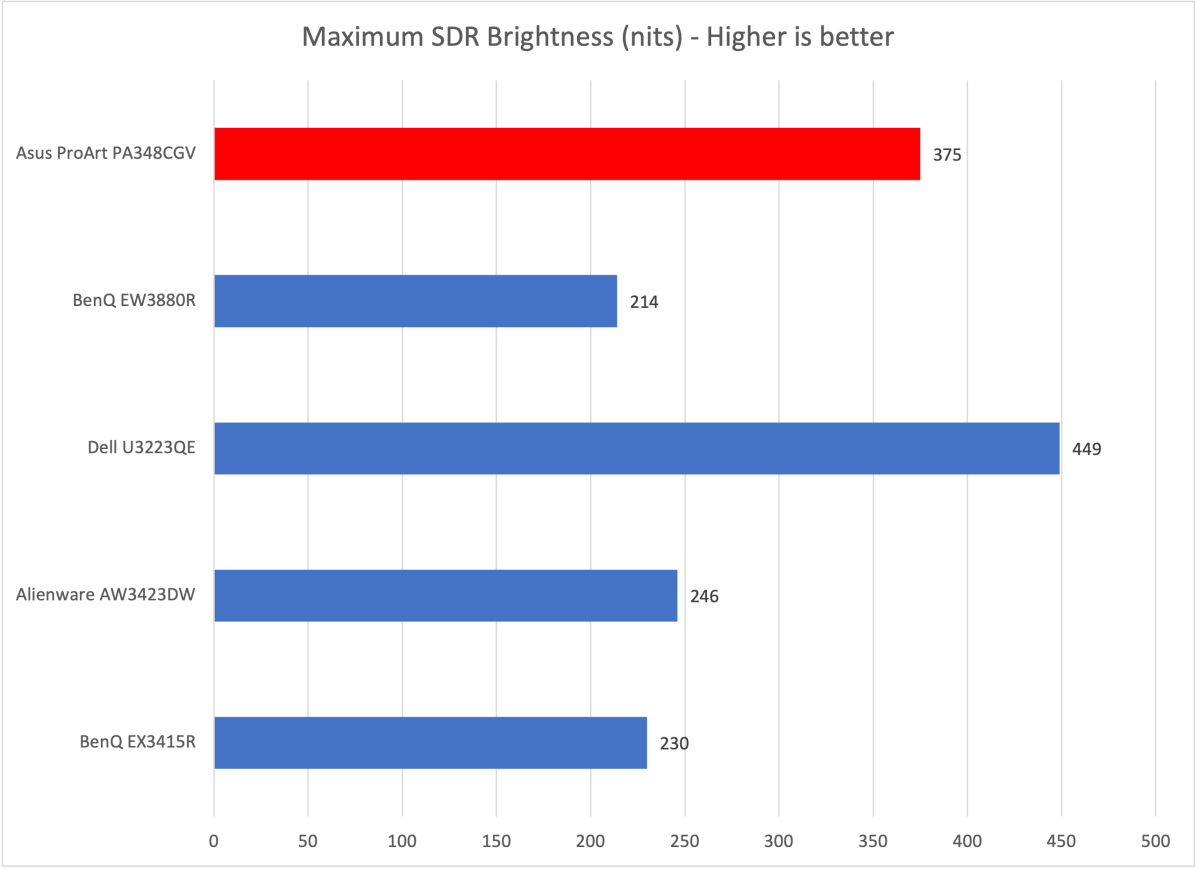
Asus starts out strong with a maximum brightness of 375 nits in SDR. This level of brightness is not unusual in 2022 but does stand out among ultrawide monitors I’ve recently tested.
Most users will want to turn down the brightness significantly for general use: I left it around 25 percent of maximum. The brightness will be appreciated in bright rooms, as the display remains vivid, and easy on the eyes.
Matt Smith
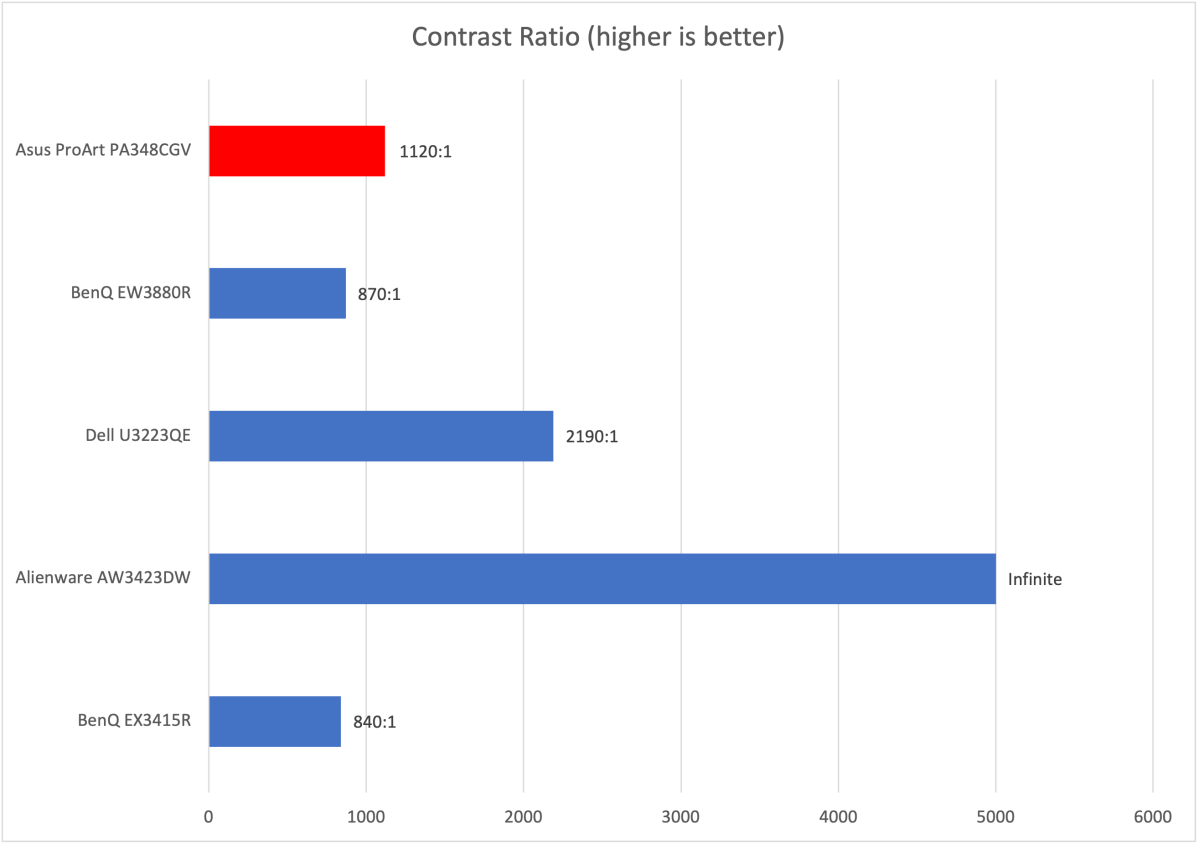
As mentioned, the PA348CGV lacks any cutting-edge display panel or backlight features, and that has consequences for its contrast ratio. The monitor’s unsophisticated backlight and IPS panel provides a maximum contrast ratio of just 1120:1.
That’s not bad for an ultrawide with an IPS panel but obviously falls behind the OLED panel in the Alienware AW3423DW. It’s also inferior to the Dell Ultrasharp U3223QE’s IPS Black panel (though, unfortunately, this panel type is not currently available in an ultrawide format).
You should expect disappointing black levels and some missing detail in dark scenes. This isn’t much of an obstacle for content creation but becomes obvious when watching movies or playing games with dark visuals such as Diablo 2: Resurrected.
Matt Smith
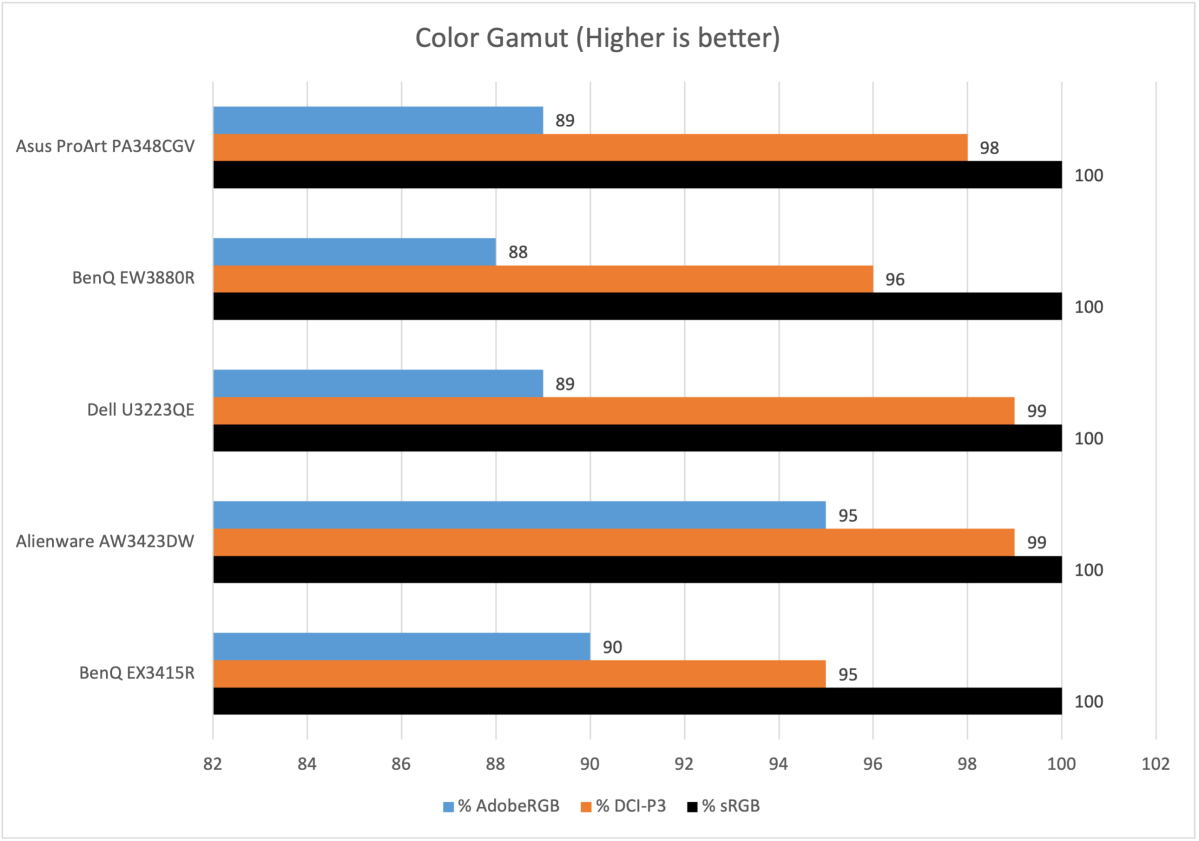
The PA348CGV’s color gamut is strong, delivering 100 percent of sRGB and 98 percent of DCI-P3. This is right in line with the Dell U3223QE and certainly qualifies it as a “wide gamut” monitor. The PA348CGV also has a true 10-bit panel.
As a result, the PA348CGV displays a huge variety of color with minimal banding in gradients. It’s a very impressive display in this regard. I noticed almost no color banding in Microsoft Flight Simulator. The simulator’s expanse of a blue sky, with its subtle variations in hue, can lead to obvious, distracting bands of color on less capable monitors.
The monitor also looks wonderfully vivid straight out of the box, with a punchy, over-saturated style that many casual owners will prefer. Any bright, vivid content, whether it’s a game or animated film, looks spectacular.
Matt Smith
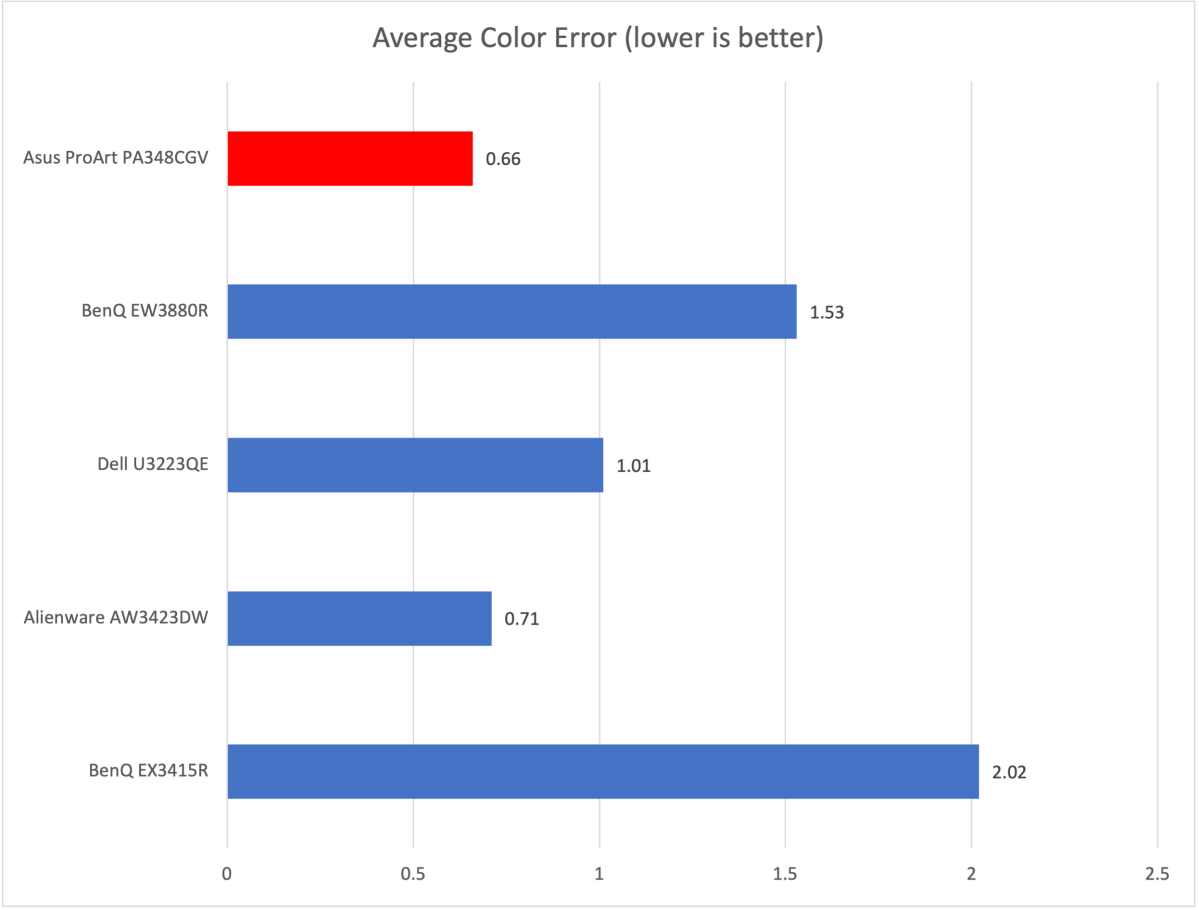
Color accuracy comes in strong, defeating all other monitors in this competitive set. None of these monitors, aside from the BenQ EX3415R, are especially inaccurate, but it’s always great to see precision in a monitor built for content creation.
The monitor also did well in gamma and color temperature. It hit a gamma curve of 2.2, which means content looks about as bright as expected, and an ideal color temperature of 6500K. And, as mentioned, the monitor has multiple gamma color temperature settings. These settings also were accurate to their stated targets, which makes calibrating the monitor to your specific needs easy.
Sharpness is just adequete. The monitor’s resolution of 3440×1440, spread across the 34 inches of ultrawide screen, provides a pixel density of 109 pixels per inch. This is similar to a 27-inch 1440p monitor. Fine fonts are detailed, photos look sharp, and games seem crisp. However, there’s not enough resolution here for 4K video editing. Serious photographers may also need more pixels to handle high-resolution DSLR photos.
I came away impressed by the Asus ProArt PA348CGV’s SDR performance. It does a wonderful job of blending the precision content creators demand with the brilliance and punchy color owners will want for casual use. This monitor is an excellent choice for a home office, as it’s well suited to both professional applications and PC games.
Asus ProArt PA348CGV: HDR image quality
The Asus ProArt PA348CGV supports HDR10 but isn’t VESA DisplayHDR certified. That left me with low expectations, and the monitor easily cleared them.
Maximum HDR brightness is good at 515 nits, and the monitor sustains this brightness well without fluctuation between full-screen and 10 percent windows. In short, the display appears uniformly bright when showing a variety of bright content..
The exception to this is the monitor’s local dimming mode, which is on by default. I was shocked to find it performs okay despite the monitor’s basic backlight system. Switching between scenes doesn’t normally cause a dramatic and distracting variance in brightness.
But don’t get too excited. While it didn’t ruin image quality, local dimming also failed to increase the measured contrast ratio. It also caused blotchy variations in brightness when viewing dark scenes.
The PA348CV handled tone mapping well. For example, maximizing HDR brightness didn’t cause the cells of an Excel spreadsheet to disappear, a problem visible on many entry-level HDR monitors.
There are still serious limitations to the PA348CV’s HDR performance. It lacks the brightness and contrast required to make HDR content truly stand out. However, HDR performance is passable for general use, providing some increase in brilliance and a bit more detail in bright portions of a scene. That’s enough to place the PA348CV ahead of similarly priced competitors.
Asus ProArt PA348CGV: Motion clarity
Most professional monitors are not good for gaming, as they lack both the pixel response times and refresh rates gamers demand. The Asus ProArt PA348CGV is an exception to this rule. It claims a gray-to-gray pixel response time of two milliseconds and has a 120Hz refresh rate. It officially supports AMD FreeSync Premium Pro and should unofficially work as a G-Sync compatible monitor, though I was unable to verify that.
Motion clarity is very solid. Fast moving objects retain good detail and fast camera pans in games don’t obscure the background. Blur Busters’ gaming test, which rapidly pans across a scene in League of Legends, proved characters and health bars remain identifiable. Character names, however, were too blurry to read.
The PA348CGV’s performance is what I expect from a 120Hz or 144Hz monitor, and that’s good news. This level of motion clarity is more than adequate for most PC gamers and a major improvement over a 60Hz refresh rate.
Final thoughts
The Asus ProArt PA348CGV is a superb ultrawide monitor that manages to serve a huge range of users. It’s equally excellent for professional content creators, gamers, and prosumers who have basic needs but want a premium experience. It’s also a rare example of a monitor that’s equally suited to both content creation and gaming.
Here’s the kicker: It’s $729. That’s not cheap, to be sure, but the PA348CGV is priced similarly to high-end competitors that lack its versatility. Monitors like the $700 BenQ EX3415R and $750 LG UltraGear 34GP83A-B are great for gaming but not nearly as capable for creators, while Dell’s $620 U3421DW is solid for creators but disappointing in PC games. The PA348CGV does it all without increasing the price.