Nvidia and the 3D Future of the Internet

There is a lot of work going into creating the next generation of the web. Most of it is focused on the concept that, rather than traditional web pages, we’ll have a very different experience that is far more immersive. Let’s call it “Web 3D.”
I had a chance to talk with Nvidia’s CEO Jensen Huang who shared his view of Web 3D. While it blends elements of the metaverse, it’s tied more to the AI implementation that will front-end the next generation of the web than it is to the emulation of reality increasingly fund on that new web.
Confused? You aren’t alone, let me try to untangle the concept.
Then we’ll look at my product of the week, a very different Amazon Kindle called Scribe. It shows promise but needs a couple of tweaks to become a great product.
AI Fronts the Next Generation Web
Interestingly, I think Microsoft’s Halo game series got this right to begin with because Cortana, Microsoft’s fictional AI universal interface, is closest to what Huang indicated was his vision of the future web.
In the game and TV series “Halo,” Cortana is what Master Chief interacts with to access the technology around him. Sadly, even though prototypes like the one in this YouTube video were built, Microsoft hasn’t yet taken Cortana to where it could be.
Right now, Cortana lags behind both Siri, Apple’s digital assistant, and Google Assistant.
Huang envisions that an AI front end will become reality with the next generation of the web. You’ll be able to design your AI interface or likely license an already created image and personality from different providers as they step up to this opportunity.
For instance, if you wanted the AI to look like your perfect boyfriend or girlfriend, you could initially describe what you want to an interface and the AI would design one based on what you trained that AI to look for.
Alternatively — and this isn’t mutually exclusive — it could design it based on your known interests, pulling from the cookies and web posts you’ve made during your life. Or you could choose a character from a movie or an actor, which would come with a recurring charge, that would, in character, become that personal interface.
Imagine having Black Widow or Thor as your personal guide to the world of information. They’d behave just as they do in the “Avenger” movies while getting you to the information you’re looking for. Rather than seeing a web page, you’d see your chosen digital assistant which would magically bring up metaverse elements to address your questions.
Search in a Metaverse Experience
Search as we know it would change as well.
For instance, when looking for a new car, you might go to different manufacturers’ web sites and explore the options. But in the future, you might instead say “what car should I now buy?” and, based on what the AI knows about you, or how you answer questions about your lifestyle, it would then provide its recommendation and pull you into a metaverse experience where you virtually test drive the car that is based on the options the AI thinks you’ll want.
During this virtual drive, it will add other options that you might like, and you’ll be able to convey your interest, or lack thereof, to come to a final choice. Finally, it will recommend where you should buy your car, faving whatever outlook optimized to whether you valued things like low price or good service more. These options would include both new and used offerings depending again on what the AI knows about your preferences.
Time and effort spent on the project would be massively reduced while your satisfaction, assuming the information the AI has on you is accurate, is maximized. Over time, this Web 3D interface would become more of a companion and trusted friend than anything you’ve seen on the web so far.
Once it reaches critical mass, care will need to be taken to assure it isn’t compromised to favor the interests of a political party, vendor, or bad actor.
This last is important. It may turn out that instead of being free like browsers are today, the interface ends up being a paid service to make sure no other entity can take advantage of your trust, because there is a substantial opportunity to use this new interface against you. Assuring that won’t happen should be getting more focus than it is currently.
Wrapping Up
According to Huang, the future of this front end — call it the next generation browser — is an increasingly photorealistic avatar that is based on your personal preferences and interests; one that can behave in character when needed; and one that will provide more focused choices and a far more personalized web experience.
Perhaps we should be talking less about the next generation of the web in terms of its visual aspects, the 3D part, and more about its behavioral aspects, the “Transhumanist Web.” Something to noodle on this week.

Kindle Scribe
I’ve been using Kindles since they were first released. Mine had both a keyboard and a free cellular connection.
They’ve proven to be interesting products when traveling, have days-long battery life, and perform better in the sun than LCD-based tablets or smartphones. Some are water resistant, allowing you to use them during water recreation activities. For instance, when I float on the river near my home, I’ll bring my water-resistant Kindle with me so that I can read during the boring parts (for me, the entire float is the boring part).
But they have always been limited to being able to read books and certain digital files (you could email .pdf files to Amazon to put on your Kindle). That just changed with the new Kindle Scribe. It’s similar in size to the 10-inch Amazon Fire tablet and allows you to mark up the documents and books you are reading.
While the Kindle Scribe is still a reading-focused product, this latest version has optional pens that can be used to draw or annotate things you are reviewing and it will, as most similar products do, allow you to draw pictures if that is your interest.
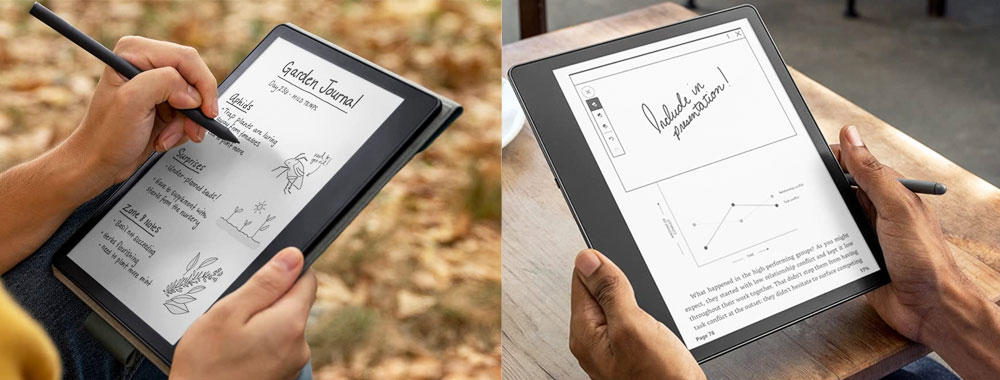
Kindle Scribe (Image Credit: Amazon)
As with all Kindles, it leads with the e-paper display that works well in the sun, and the large size means that you can better adjust the font to address sight problems, potentially removing the need for reading glasses for folks who have only slight vision loss.
Shortcomings that limit the product are that it currently doesn’t support magazine or newspaper subscriptions, it doesn’t play music (probably better left to your smartphone anyway), and, as noted, the refresh rate on the technology is too low for video. It doesn’t currently do email either.
It has a web browser, but that browser doesn’t display web pages as intended. Instead, it lists the stories vertically like a small-screened smartphone might. In fact, using it, you get a lot of page load problems. For instance, I was not able to bring up Office 365 or Outlook web sites.
Finally, it doesn’t support handwriting conversion to text, making it less useful for note taking than products that have this functionality, but I expect this will improve as the product matures.
The person that will most appreciate this product is someone who wants a bigger reader and occasionally needs to markup documents as part of an editing or review process. If you want a more capable tablet, the Amazon Fire tablet remains one of the best values in the market, but it won’t work as well outside, nor does it have battery life anywhere near what the Kindle Scribe provides.
For the right person, the Kindle Scribe could be a godsend. But for most, the Amazon Fire tablet is likely the better overall choice. In any case, the new Kindle Scribe tablet is my product of the week. At $339, it’s a good value that I expect will get better over time.
Kindle Scribe will be released Nov. 30. You can pre-order it now at Amazon.
The opinions expressed in this article are those of the author and do not necessarily reflect the views of ECT News Network.