Skip to content
Fri. Dec 5th, 2025
  • Facebook
  • Twitter
  • Instagram
  • Youtube
  • VK
  • Whatsapp

Tech News

Technology News,iPhone Reviews,iPad Reviews

Primary Menu
  • Home
  • NEWS
  • AccessoriesBlocks
  • Insider
  • PodcastExclusive
  • APPS
  • HOW TOS
  • Daily Tips
  • Headlines
  • Home
  • Poly Studio P5 Packs Professional Webcam Properties [Review]
  • NEWS

Poly Studio P5 Packs Professional Webcam Properties [Review]

4 min read

In the wide-open field of videoconferencing tools spawned by the pandemic, the Poly Studio P5 professional webcam should be high on your list of candidates for home or office use.

This USB 2.0 plug-and-play camera comes with an integrated type A cable, privacy shutter, and an adjustable monitor clamp that doubles as a desktop base. The removable upper lens barrel is tripod ready.

Its cover hides a built-in USB-A port to connect a wireless adapter for a headset or other accessories. An impressive cylindrical design in the shape of an eye has a rotating band around the front edge to open or close the lens to prevent accidental viewing, which is a handy feature.

When you turn the dial clockwise, a three-piece red cover closes off the lens chamber. Turning the dial counterclockwise pulls the cover off the lens. In addition, an LED at the top of the lens barrel changes color from red to green as a further safety indicator.
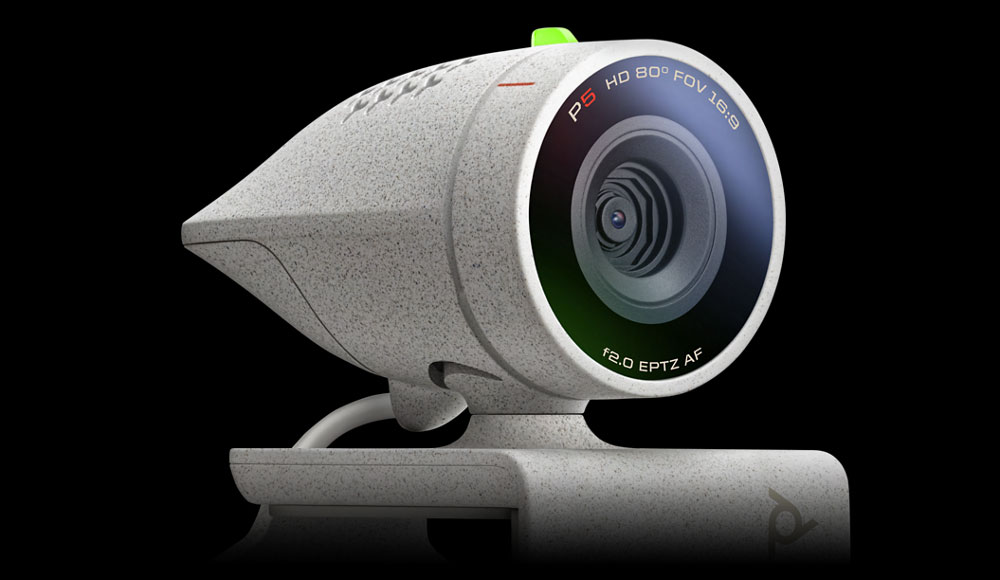
Poly Studio P5 optics

Poly Studio P5 professional webcam (Image Credit: Poly)


The Poly Studio P5 is one of the more intriguing videoconference tools offered by the manufacturer formerly known as Polycom/Plantronics. It has a solid feature set for an attractive price of $78.95.

Flexible Use Cases

You can use the P5 as a desktop webcam or add it to a laptop computer without a built-in camera. Even better, you can plug this webcam into a laptop with an existing camera and quickly select the Poly camera.

I especially like the ease with which I can move this webcam from one computer to another without installing or reconfiguring anything. This ability comes in handy in your home or company office has multiple computers.

Even with first-time connections, all that is needed is to plug in the USB cable and select the Poly cam in whatever conferencing application you use. No driver downloads are required.

Poly does provide a free downloadable Poly Lens Desktop App for custom controls. The app offers unique tools for adjusting camera settings and other features.

The desktop apps are available for Windows and Apple computers. Though unless you have specific needs that involve networking devices or special configurations, the computer apps are unnecessary.

High-Tech Specs

Poly’s 1080p (Full HD) / 720P (HD) compatible hardware provides 30 FPS (frames per second) with 80-degree diagonal field of view (DFOV) performance. It has a bevy of built-in features that automatically improve video performance.

For instance, autofocus with 4x zoom / EPTZ is included, as is a single directional microphone optimized for personal workspaces. It provides 50 Hz to 16 kHz frequency response.

Subscribe to the TechNewsWorld Newsletter

I had no trouble using the Poly P5 in various lighting conditions. The lens apparatus automatically adjusts for dim or bright lighting environments.

The low-light quality and true color image technology are certified by Zoom and Microsoft Teams. The P5 is compatible with any application that supports USB/UVC standards.

Wide Range of Compatibility

System requirements listed on the P5 data sheet are:

  • Windows version 8.1, 10, or later
  • Mac OS X version 10.7 or later
  • USB 2.0 port

But you are also in luck if you have Linux or Chromebook computers, although nothing in Poly’s documentation indicates that the P5 is compatible with either of these operating systems. Nor do the company’s download servers refer to a desktop application or camera drivers for Linux or ChromeOS devices.

Since I use all those configurations, I was hoping for a one-size-fits-all videoconferencing solution. Chromebook cameras are notorious for their low-quality vidcams.

To my great surprise, the P5 did not disappoint. I plugged in the USB cable to both the Linux and Chromebook computers expecting to see no second camera available. As with Windows and Mac gear, the webcam instantly lit up with no configuring needed — and the performance was better than what it replaced.

Since I have no use for the desktop application video tool for adjusting the P5, I was ahead on all counts.

Minor Issues

The P5 is a close-to-perfect solution for meeting your personal and business needs. Although it does have a few issues, none of them are severe enough to become a deal breaker.

For instance, the built-in microphone is mediocre in its sound production. Despite the directional microphone, the audio output is noisier and more muffled than I prefer.

The audio issue is minor, provided your computer has a plug-in or built-in microphone. If not, the spare port under cover in the P5 comes in handy as a workaround.

Another example is the four-foot USB cable. If you attach the P5 to a laptop, you have no problem reaching the port. However, a desktop console that is not close to the monitor may pose a plug-in problem.

That situation has a relatively easy fix: just get a USB extension cable to add length.
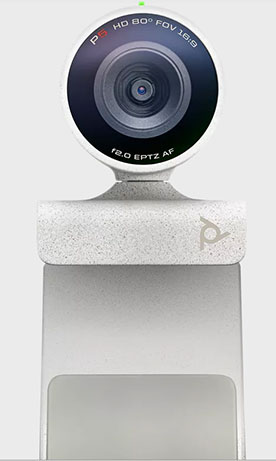
Poly Studio P5 webcam

Image Credit: Poly

Poly Studio P5 Dimensions, Weights, Warranty

Camera body only:

  • 1.5 W x 1.3 H x 2.4 D (Inches)
  • 37.7 W x 34 H x 62 D (MM)
  • 2.4oz / 68g

Camera with monitor clamp:

  • 2.4 D x 1.7 H x 2.7 D (Inches)
  • 60 W x 43 H x 68 D (MM)
  • 3.3oz / 98g

Warranty:

  • A two-year limited warranty is included.


Bottom Line

In most cases, the Poly Studio P5 professional webcam can outperform your built-in computer camera, and it works out of the box with no setup required.

This handy device, with its free desktop applications, provide enhancement capabilities. Together they give you what their name implies — premium quality performance. Just add a better microphone if you do video presentations for work.


Suggest a Review

Is there a tech product or application you’d like to suggest for review? Something you love or would like to get to know?

Please email your ideas to me and I’ll consider them for a future column.

And use the Reader Comments feature below to provide your input!

Tags: Packs Poly professional Properties review Studio Webcam

Continue Reading

Previous: Nvidia and the 3D Future of the Internet
Next: Noncompete Agreements Are Bad Business

Related Stories

Qualcomm-Snapdragon-4s-Gen2.jpg New Qualcomm Chip Set To Supercharge Affordable 5G Phones 5 min read
  • NEWS

New Qualcomm Chip Set To Supercharge Affordable 5G Phones

reading-online.jpg ‘Pink Slime’ Websites Outnumber Daily Newspapers on the Internet 5 min read
  • NEWS

‘Pink Slime’ Websites Outnumber Daily Newspapers on the Internet

Apple-Intelligence-WWDC24.jpg Apple Goes All-In on a Privacy-Based AI Experience 5 min read
  • NEWS

Apple Goes All-In on a Privacy-Based AI Experience

Tim-Cook-WWDC24.jpg Apple Outdoes Google and Microsoft in AI Rollout 6 min read
  • NEWS

Apple Outdoes Google and Microsoft in AI Rollout

ewaste-computers.jpg Windows 10 End of Life Could Bury Landfills in E-Waste 5 min read
  • NEWS

Windows 10 End of Life Could Bury Landfills in E-Waste

CopilotPC.jpg The Copilot+ PCs Have Arrived: Initial Impressions 6 min read
  • NEWS

The Copilot+ PCs Have Arrived: Initial Impressions

AFTK Social

  • Facebook
  • Twitter
  • Instagram
  • Youtube
  • VK
  • Whatsapp
  • Latest
  • Popular
  • Trending
  • best-budget-laptops-1.jpg Best laptops 2025: Premium, budget, gaming, 2-in-1, and more
    • Editor's Choice

    Best laptops 2025: Premium, budget, gaming, 2-in-1, and more

  • MS-Project.jpg If you’re working with complex projects, this $15 app makes them much simpler
    • Editor's Choice

    If you’re working with complex projects, this $15 app makes them much simpler

  • Netflix-Hintergrund-1.jpg Best VPN for streaming Netflix 2025: Best overall, cheap, free, and for travelers
    • Editor's Choice

    Best VPN for streaming Netflix 2025: Best overall, cheap, free, and for travelers

  • KDE-Plasma-Desktop-screenshot-promo-1.jpg Don’t toss your Windows 10 PC! Try switching to KDE Plasma instead
    • Editor's Choice

    Don’t toss your Windows 10 PC! Try switching to KDE Plasma instead

  • snipping_tool_in_windows-1.jpg Windows 11’s Snipping Tool now creates DIY animated GIFs
    • Editor's Choice

    Windows 11’s Snipping Tool now creates DIY animated GIFs

  • best-budget-laptops-1.jpg Best laptops 2025: Premium, budget, gaming, 2-in-1, and more
    • Editor's Choice

    Best laptops 2025: Premium, budget, gaming, 2-in-1, and more

  • Meet Jo Jo, Body Positive Model and Cousin of Gigi
    • Headlines

    Meet Jo Jo, Body Positive Model and Cousin of Gigi

  • Finland’s Down’s model Maija makes strides on catwalk
    • Headlines

    Finland’s Down’s model Maija makes strides on catwalk

  • How to Create Adjustment Layers Based on Color
    • NEWS

    How to Create Adjustment Layers Based on Color

  • If You Have $5, Zendaya Found the Spring Collections
    • NEWS

    If You Have $5, Zendaya Found the Spring Collections

  • 5e90465d671ab.jpg Facebook plugs booming business version into Portal
    • ACCESSORIES

    Facebook plugs booming business version into Portal

  • 5e904636599e6.jpg Sony's PlayStation 5 launch set for late 2020
    • ACCESSORIES

    Sony's PlayStation 5 launch set for late 2020

  • 5e90460c39823.jpg Epic Games sued for not warning parents 'Fortnite' is allegedly as addictive as cocaine
    • ACCESSORIES

    Epic Games sued for not warning parents 'Fortnite' is allegedly as addictive as cocaine

  • 5e90459eaad1d.jpg Boeing reports another big drop in deliveries in 3Q
    • ACCESSORIES

    Boeing reports another big drop in deliveries in 3Q

  • 5e90457922df5.jpg New approach for modern power grids that increases efficiency, reduces cost
    • ACCESSORIES

    New approach for modern power grids that increases efficiency, reduces cost

Protect your privacy

Tech News List

Qualcomm-Snapdragon-4s-Gen2.jpg 5 min read New Qualcomm Chip Set To Supercharge Affordable 5G Phones
  • NEWS

New Qualcomm Chip Set To Supercharge Affordable 5G Phones

reading-online.jpg 5 min read ‘Pink Slime’ Websites Outnumber Daily Newspapers on the Internet
  • NEWS

‘Pink Slime’ Websites Outnumber Daily Newspapers on the Internet

Apple-Intelligence-WWDC24.jpg 5 min read Apple Goes All-In on a Privacy-Based AI Experience
  • NEWS

Apple Goes All-In on a Privacy-Based AI Experience

Tim-Cook-WWDC24.jpg 6 min read Apple Outdoes Google and Microsoft in AI Rollout
  • NEWS

Apple Outdoes Google and Microsoft in AI Rollout

ewaste-computers.jpg 5 min read Windows 10 End of Life Could Bury Landfills in E-Waste
  • NEWS

Windows 10 End of Life Could Bury Landfills in E-Waste

Categories

  • ACCESSORIES
  • APPS
  • DAILY TIPS
  • Editor's Choice
  • Headlines
  • HOW TOS
  • INSIDER
  • NEWS
  • PODCAST

Recent Posts

  • Best laptops 2025: Premium, budget, gaming, 2-in-1, and more
  • If you’re working with complex projects, this $15 app makes them much simpler
  • Best VPN for streaming Netflix 2025: Best overall, cheap, free, and for travelers
  • Don’t toss your Windows 10 PC! Try switching to KDE Plasma instead
  • Windows 11’s Snipping Tool now creates DIY animated GIFs

You may have missed

best-budget-laptops-1.jpg Best laptops 2025: Premium, budget, gaming, 2-in-1, and more 14 min read
  • Editor's Choice

Best laptops 2025: Premium, budget, gaming, 2-in-1, and more

MS-Project.jpg If you’re working with complex projects, this $15 app makes them much simpler 1 min read
  • Editor's Choice

If you’re working with complex projects, this $15 app makes them much simpler

Netflix-Hintergrund-1.jpg Best VPN for streaming Netflix 2025: Best overall, cheap, free, and for travelers 14 min read
  • Editor's Choice

Best VPN for streaming Netflix 2025: Best overall, cheap, free, and for travelers

KDE-Plasma-Desktop-screenshot-promo-1.jpg Don’t toss your Windows 10 PC! Try switching to KDE Plasma instead 2 min read
  • Editor's Choice

Don’t toss your Windows 10 PC! Try switching to KDE Plasma instead

Recent Posts

  • Best laptops 2025: Premium, budget, gaming, 2-in-1, and more
  • If you’re working with complex projects, this $15 app makes them much simpler
  • Best VPN for streaming Netflix 2025: Best overall, cheap, free, and for travelers
  • Don’t toss your Windows 10 PC! Try switching to KDE Plasma instead
  • Windows 11’s Snipping Tool now creates DIY animated GIFs
  • Hundreds of Minecraft mods on GitHub are infested with hard-to-spot spyware
  • This 1440p OLED gaming monitor is just $500 today
  • Best budget gaming laptops 2025: Top affordable picks for performance
  • Airrobo PC10 robotic pool cleaner review: An effective low-budget cleaning option
  • Intel teases huge leaps for 18A, the tech behind its next-gen CPUs

Search

Tags

AI Air App Apple Apps artificial Battery Beta Boeing Data Disable Download Enable EU Facebook FaceTime Fix Free gaming Google iOS iPad iPhone Laptop Mac MacOS Media Microsoft Mode Mojave Pro Released Researchers Screen Social Store Surface Tech Testing Tips top Update Video Windows world

Tech Gallery

  • Home
  • About
  • Blog
  • Contact
  • Facebook
  • Twitter
  • Instagram
  • Youtube
  • VK
  • Whatsapp
Copyright © All rights reserved. | WPfastworld